



Important
Community project — not affiliated with AWS or the strands-agents team. Bugs here? Open an issue. Bugs in the underlying SDK? Head to strands-agents.
Strands Compose lets you describe an agent system in a single YAML file, and Strands Compose Agentcore runs that system on AWS Bedrock AgentCore Runtime.
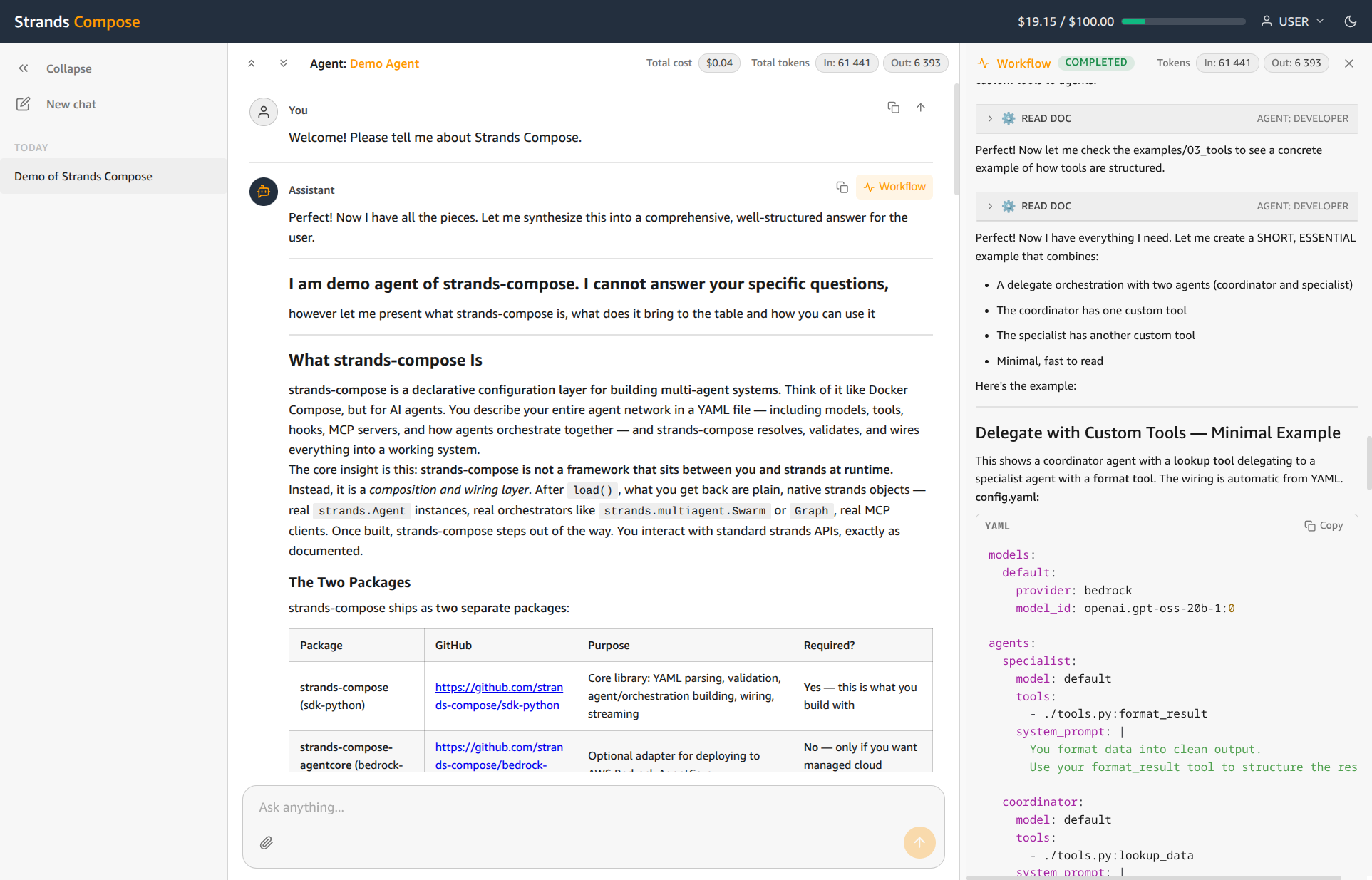
Strands Compose Chat is the front door: a complete web application where people sign in, open a conversation, and chat with the agents you have built. It handles everything around them - user accounts, conversations, history, access control, and usage tracking.
Focus on building agents, and this app makes them accessible to your users.
Where it fits in the ecosystem:
| Layer | Package | Who uses it |
|---|---|---|
| Define the agents | strands-compose | Developers |
| Run / deploy the agents | strands-compose-agentcore | Developers, operations |
| Put the agents in front of people | strands-compose-chat | End users |
chat-demo-admin.mp4
The application comes complete — there is nothing to assemble:
| Feature | What it gives you |
|---|---|
| Chat interface | Live, streaming replies with multi-agent systems showing their work as it happens. Conversations are saved so people can return to earlier threads. |
| File attachments | Users can send images and documents alongside their messages, within configurable size limits. |
| User accounts and sign-in | Built-in username/password accounts, plus optional single sign-on (SSO) through your existing identity provider — Microsoft Entra, Okta, Google, or any standards-based OAuth provider. |
| Access control | Agents are organised by group, so each person only sees the agents they are entitled to use. Access is closed by default. |
| Admin panel | A web console where an administrator registers agents, manages users and groups, and reviews activity. |
| Usage and cost tracking | Every interaction records token usage, with per-model pricing, per-user budgets, and a dashboard for both administrators and individual users. |
- Freelancers and small teams who have built an agent and need to put it in front of clients or colleagues quickly, with a polished interface and proper sign-in.
- Organisations that want an internal AI assistant or department-specific agents, gated behind company SSO, with usage and cost visibility for budgeting.
- Anyone delivering an agent as a product or internal service who would rather configure a chat app than build and maintain one.
The application is published on PyPI as strands-compose-chat and includes the
web interface bundled in. Installing it gives you a command-line tool available
as strands-compose-chat or its short alias scc.
pip install strands-compose-chatA minimal local run:
scc migrate     # create the database
scc serve       # start the web server on http://127.0.0.1:8000
Two worked setups are in the examples directory:
01-local-dev— run on your own machine with a local database. The fastest way to try the app.02-docker— a production-like stack (the app plus a PostgreSQL database) with Docker Compose. Recommended for production, and the basis for deploying to orchestrators such as ECS or Kubernetes.
Each example has step-by-step instructions and a configuration template.
The full guide lives in docs/. Start with the part that fits you:
| You want to | Read |
|---|---|
| Understand the app and how it works | What Is This?, Architecture |
| Run it and add your first agent | Getting Started, Agents |
| Chat with agents | Using the Chat |
| Manage users, access, budgets and SSO | Admin Panel, Authentication, Access, Budgets and Pricing |
| Configure and deploy to production | Configuration, Docker and Gunicorn, ECS Fargate, Operations |
| Call the API or change the code | HTTP API and Streaming, Developer Guide |
The intent here is a brief map, not a deep reference — detailed documentation
lives in docs/.
Architecture.
A single deployable application made of two parts: a Python backend and a web frontend that ships bundled inside it. The backend exposes the API and serves the interface; the frontend is what users see in the browser. The backend talks to your agents only through the strands-compose SDK, so anything agent-related stays consistent with the rest of the ecosystem.
Tech stack.
Built on a modern, high-performance stack selected for streaming and multi-tenant workloads. The async backend handles concurrent SSE streams without blocking, the database layer uses async SQLAlchemy 2.0 with eager-loaded relationships and parameterised queries throughout, and the frontend delivers a responsive interface with real-time updates via an event-driven store.
| Layer | Technology |
|---|---|
| Backend | FastAPI, async SQLAlchemy, Pydantic, Alembic, sqladmin, uvicorn |
| Frontend | React, TypeScript, Vite |
| Database | SQLite (local development), PostgreSQL (production) |
Security.
Authentication, authorisation, and transport security are implemented to production standards with no shortcuts. Every endpoint is gated, every credential is hashed or redacted, and production mode enforces a strict baseline at startup — refusing misconfiguration rather than running with it silently.
| Area | Implementation |
|---|---|
| Authentication | Session-cookie and Bearer API key. Constant-time, enumeration-safe. |
| Password storage | Argon2id hashes only; raw credentials are never persisted or logged. |
| Authorisation | Role-based FastAPI dependencies on every endpoint. Agent visibility requires explicit group membership. |
| OIDC / SSO | Standards-based OAuth 2.0 / OpenID Connect; redirect targets validated against open-redirect. |
| Security headers | Strict-Transport-Security, X-Content-Type-Options, Content-Security-Policy, X-XSS-Protection, Referrer-Policy on every response. |
| Framing | frame-ancestors 'self' / X-Frame-Options: SAMEORIGIN by default, so a same-origin page can embed the app; FRAME_ANCESTORS=[] denies framing outright. Cross-origin embedding is not offered — it would require a SameSite=None session cookie. |
| Transport | TrustedHostMiddleware, configurable CORS_ALLOWED_ORIGINS. |
| Production hardening | APP_ENV=prod enforces HTTPS-only cookies, rejects SQLite and wildcard CORS/host settings at startup. |
| Secrets handling | All credentials via environment variables; sensitive fields redacted in logs, diagnostics, and config repr. |
Everything runs through just recipes, called with uv run just <recipe> so you need nothing installed besides uv. The UI has its own guide in ui/README.md; the full developer map is Chapter 16.
Prerequisites: Python 3.11+, uv, Node.js 22+, Git with Git LFS (git lfs install once).
git clone https://github.com/strands-compose/chat
cd chat
uv run just install           # Python dependencies + git hooks
npm --prefix ui ci            # UI dependencies; the Biome hook needs them
cp example.env .env           # then set SESSION_SECRET_KEY
Every command here runs as written in bash, zsh and PowerShell.
Everyday recipes (uv run just lists all of them):
| Recipe | What it does |
|---|---|
check |
Python: fix import order and format, then ruff lint, ty types, bandit security |
verify |
The same checks as check, but changes no file; CI runs it |
format |
Python: sort imports and format with ruff |
test |
Python tests (all but the @postgres tier), with coverage |
check-ui / format-ui |
UI: check / fix format, import order and lint with Biome |
build-ui |
Build the UI into the Python package (src/strands_compose_chat/static) |
migrate / revision "msg" |
Apply migrations / generate a new one |
check-hooks |
Run every git hook on every file |
commit-files |
Write a commit message interactively (Commitizen) |
Git hooks are installed by just install (again later: uv run just install-hooks). They run on every git commit and git push:
| Hook | Checks |
|---|---|
| File checks | Trailing whitespace, final newline, mixed line endings, merge markers, large files, YAML/TOML syntax |
ruff, ruff-format |
Python lint and format |
biome check (ui) |
UI format, import order and lint |
detect-secrets |
No new secrets compared with .secrets.baseline |
commitizen |
The commit message follows Conventional Commits (feat:, fix:, docs: …) |
When a hook fixes a file, the commit stops: review the change, git add it, and commit again. Before a pull request, run uv run just check test check-ui and npm --prefix ui test. See CONTRIBUTING.md for the full flow.