



AI-authored 2D rigging and animation, verified before it is written. rigc is
a rig compiler: a rig spec and a motion spec in, skeleton data out — in the Spine 4.3
format, with rigc's own compiled model beside it —
gated by a list of named assertions before a byte is written — rigc's own validator in
the published package, held to a spine-core round trip's verdicts in this
repository's CI. Built so AI agents can author rigs and check their own work; it ships
as an agent skill. Its canonical npm package is @rig-c/core, under the toolchain's
scope. rig-c is the convenience install name; spine-rigc is the legacy install
name. Both remain published alongside it with the same product files.
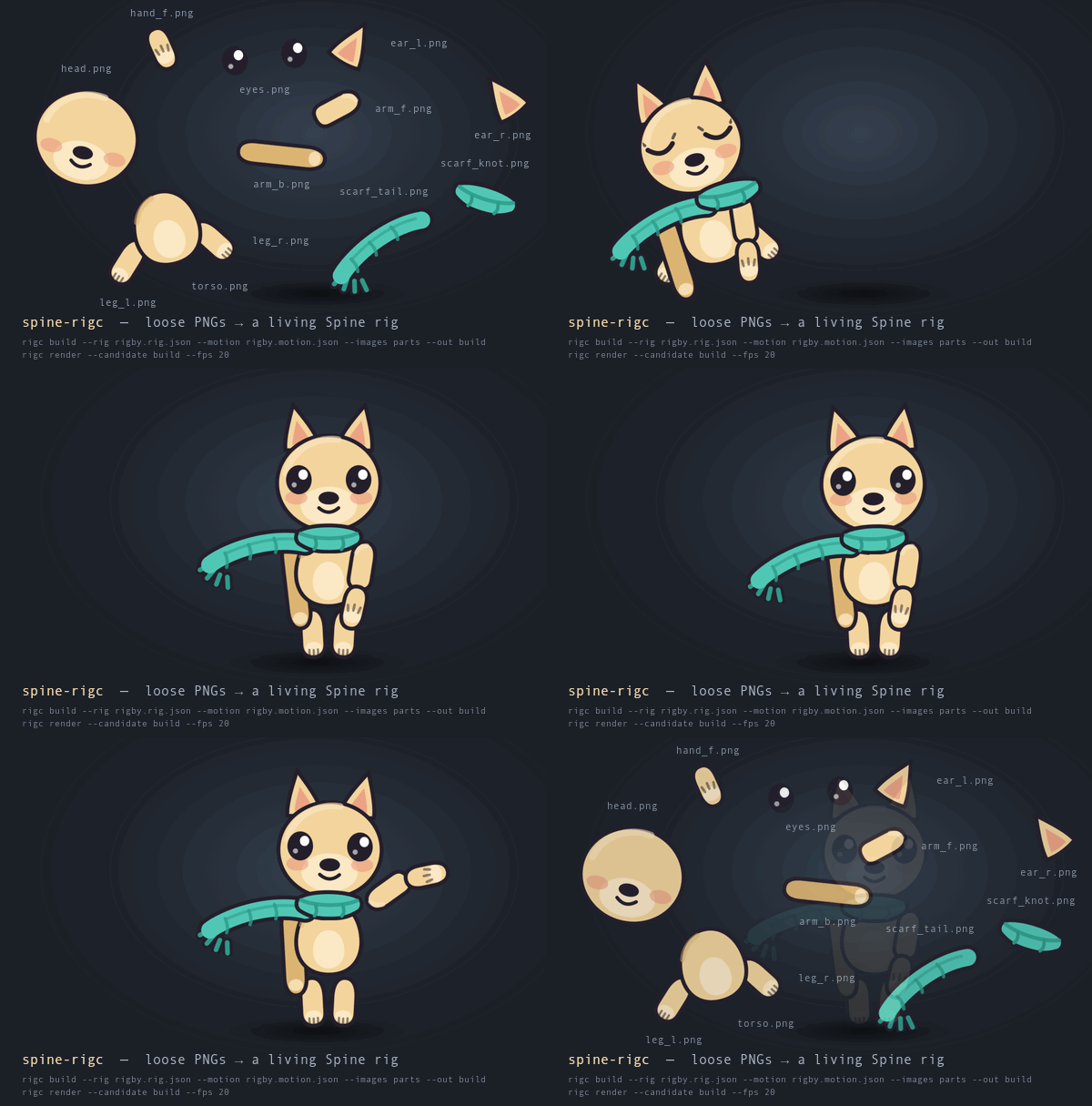
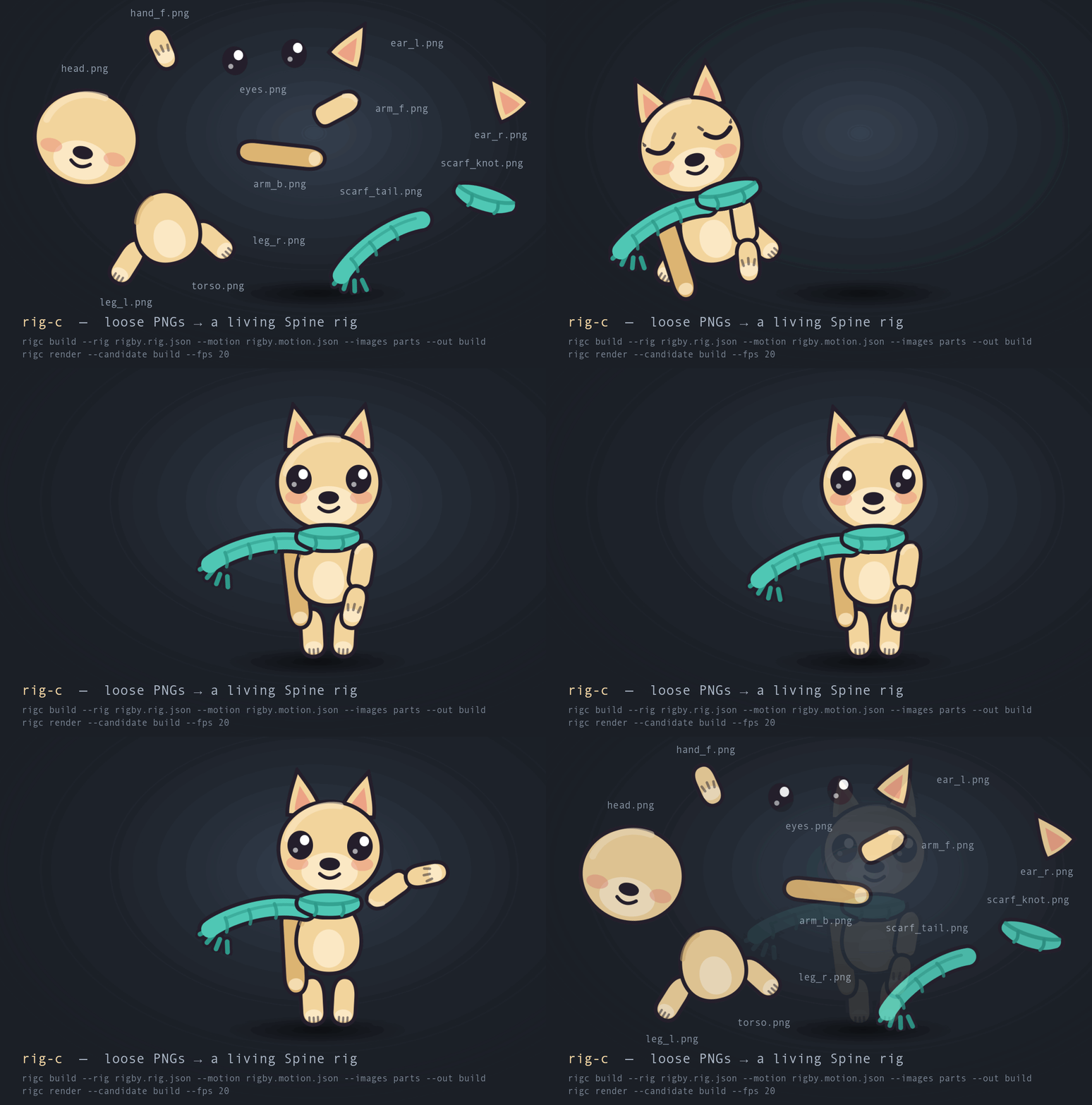
Fourteen part PNGs drawn from scratch for this repo, one rig spec, one motion spec — the assembly,
the breathing and the wave are all rigc-compiled Spine animations, rendered with
rigc render. A 2x assembly film (1200x810) sits beside it.
Loose part PNGs and two small JSON files in; Spine 4.3 skeleton data out — a
skeleton.json and a skeleton.atlas that load in any Spine runtime and import
into the Spine editor. Nothing is written unless a list of named assertions comes
back green — assertions this repository holds to the verdicts of a round-trip through
Spine's own parser, all but the parse itself, which runs only where the runtime is
installed.
| You have | You run | You get |
|---|---|---|
| part PNGs, a rig spec and a motion spec | rigc build |
skeleton.json + skeleton.atlas — or a failure named by rule, and nothing on disk |
| the same, and one texture instead of many | rigc build --pack |
the parts arranged onto shared atlas pages, written beside the skeleton — losslessly, so the picture is the picture |
| a pack somebody already made | rigc build --atlas-in |
the same skeleton, with every part resolved to a region of that atlas — or a named refusal, never a part that silently does not draw |
| a compiled rig | rigc render |
every animation as PNG frames, plus one labelled contact sheet of the whole shot |
| a compiled rig and a question about its geometry | rigc inspect |
one picture of its bones, axes, mesh edges and hulls, one bone's weights, the triangles folded over, the draw order, a world grid or a declared axis over the art — at the setup pose, one time or a sheet of several, zoomed to a bone or a slot, or beside a second build on one transform — and a legend that puts every mark back in world units |
| a compiled rig | rigc preview |
one self-contained .html that plays it in Spine's own web player |
| two to four compiled rigs | rigc vote |
one ballot page a human picks from, and the answer checked into a ledger |
| a picture of a key pose | rigc pose |
where each loose part PNG sits in it, in spec coordinates — the movement between two poses is then yours to key (the motion recipe) |
| the same picture, and a rig | rigc chainfit |
the parts pose refuses because something is drawn over them — read through the candidate's own draw order and hierarchy, with the share of each part the answer was measured on |
Everything in that table needs Bun and this package — preview and vote also
@esotericsoftware/spine-core installed beside it (see below) — and no clone, no
reference art, no art pipeline, no server.
Explicit depth, which a drawing alone does not state, makes facial features
shift by different amounts during a small head turn: the portrait depth example
uses per-part depths, while the mesh-depth look example
samples a depth map at the mesh vertices.
With @rig-c/parts' depth fields,
See-through's per-layer sheets are bound explicitly with near and zScale,
then consumed by head-turn roles in turn.roles.
The depth-yaw flow shows how a turning
surface and its alpha clipping aperture move together.
The value-driven turn is a
rig control; the consumer chooses when to move it, and
getting-started is the painting-to-rig
walkthrough.
Alpha-derived clipping takes a named source slot/skin/attachment plus explicit alpha threshold, drawing-pixel simplification tolerance and mapped vertex budget. Region, authored/resolved linked mesh and generated grid/contour depth sources use ordinary weighted clipping, with the existing validation gate before emission. See AUTHORING: Alpha-derived clipping for source-motion limits, fit reports and named refusals, and the face guide for the depth-yaw flow used in depth-driven rigging.
rigc emits Spine's own skeleton data format. That is the whole positioning, and it cuts both ways:
- The output loads in any Spine runtime, and it imports into the Spine editor.
A compiled rig is a starting point on a timeline, not a finished shot — an AI
drafts, a human refines in the editor. That hand-off is what emitting somebody
else's format buys, and
tools/editor_roundtrip.tsmeasures that it survives the trip in both directions. - The published package links no Spine runtime.
@esotericsoftware/spine-coreis a development dependency: this repository uses it to hold rigc's own validator to the round trip's verdicts — in CI, on the public example recipes and every selftest call, and on a private corpus of production rigs measured before each release. Of the 50 assertions, 49 run on both;A00_ROUNDTRIP_PARSE, the official parser's own parse, runs only where the runtime is installed and is reported as a SKIP elsewhere. There, in the parse's place, the report also carries the model side's own two parse rules,A00_MODEL_READandA00_MODEL_REGIONS_ON_PAGES, which no round-trip rule matches and the registry does not hold — so its summary totals 52 on the core entry, and its last line counts 42 rules on the model side (AUTHORING §5.2 has a row for each). Install it beside rigc (bun add -d @esotericsoftware/spine-core) and the samerigcruns the round trip on every build. The Spine Runtimes License Agreement applies to that dependency wherever it is installed.
See the licensing notice for licensing and third-party terms.
The problem rigc is aimed at is narrow. An agent asked to author a rig has no way
to tell whether it succeeded: Spine's JSON parser accepts a great deal of nonsense
without a murmur — a constraint in the 4.2 shape simply vanishes, a size: that
disagrees with the PNG collapses every UV, a four-number curve array yields NaN,
a mesh whose vertex count happens to equal its UV count silently loses its bone
weights. Every one of those loads clean, plays, and is wrong. rigc's answer is to
make the failure legible: compile from a spec, run a list of named assertions — held
to the real parser's verdicts in CI — and write nothing unless all of them are
green.
📦 rigc measures loose PNGs directly, and emits one atlas page per image unless
you ask otherwise. rigc build --pack arranges every part onto shared pages and
writes them into --out; --atlas-in builds against a pack somebody else made.
Both are opt-in and both are narrow — no trimming, no rotation, no scaling — and
AUTHORING §0.1–§0.2 states the limits before you hit them.
rigc runs on Bun (engines.bun declares >=1.4.0). The
package ships its TypeScript sources and Bun runs them, so there is no build step
and no dist/ that can drift from the repository it was cut from. What is
measured is the install itself — pack, install into an empty directory, build,
render — on Linux, macOS and Windows runners on the Bun setup-bun resolves that
day (the installs and installs-matrix jobs in
ci.yml,
repository material, not in the npm package); a platform whose leg is red there
is not one the package is known to run on. The declared >=1.4.0 floor itself is
not pinned in CI — older 1.4.x releases are untested until a report arrives.
From a source checkout, bun run verify:nova -- --label "<issue + purpose>" --owner "<who>" --session "<session id>" [--bun <version>] sends the full
selftest to the Nova pool (NOVA_RUN names the runner, or nova-run.sh is on
PATH). --bun 1.4.0 selects that exact stable release. Before upload, the hand
fetches Bun's official SHASUMS256.txt and checks that the Linux x64 baseline
archive is available; on the pool it downloads the pinned archive, verifies its
SHA-256, checks its executable's version, and puts that private Bun first on PATH
for corpus fetch and selftest. The remote command's first line is
verify:nova: Bun 1.4.0. The temporary runtime is removed on exit. Without
--bun, the pool's Bun and existing command are unchanged; dependency installation
still uses the pool runner's installation step. The selftest's exit is returned
unchanged: selecting a runtime does not promise a green run. Memory ceilings
remain those of that platform and Bun major.minor's tracked row; a missing
measurement remains a reported HOLE. Malformed, duplicate or missing
versions, unavailable releases/assets and unreadable checksums are refused by
name with exit 2 before upload. Use a published exact X.Y.Z (no v prefix,
alias, range or prerelease), or retry a failed network fetch. This is repository
verification tooling, not an installed rigc command or a change to CI's matrix.
The canonical npm package is @rig-c/core; the command it installs is rigc.
rig-c remains a convenience install name. npm
refuses the name rigc as too similar to packages that already exist, so the
project and the executable keep their name; the convenience name rig-c carries one
hyphen; the repository is rig-c/core. spine-rigc is the legacy install name for the same package: it is the name
every version up to 2.20.4 shipped under, and it stays published as an alias —
every version from 2.20.4 on is on both names, with the same files — so a
project that depends on spine-rigc keeps receiving every release. A new
project installs @rig-c/core, the canonical package under the toolchain's scope.
bunx @rig-c/core --help    # run it without installing
bun add -g @rig-c/core     # or install the command
bun add -d @rig-c/core     # or pin it in a project
npx @rig-c/core works too, as long as Bun is on PATH — the executable is a
Bun script, and npm only writes the shim that calls it.
Installed, the command is rigc. The examples below spell it bun cli.ts
because they are written from a clone of this repository (bun install, then run
the CLI in place). With @esotericsoftware/spine-core installed beside the package
the two are interchangeable — rigc build … is bun cli.ts build …. Without it,
rigc runs the entry that links none of the runtime (bun cli_core.ts in a clone):
build writes the same files gated without the parse, and a command that needs the
runtime is refused by name, saying how to get it (that entry's --help lists the
commands it runs). rigc --version names the entry that ran.
One command is a repository workflow rather than a package one: bench measures
against Spine's official example projects — fetched, never committed — and against
reference frames this project renders from them, which are committed, each
example's own license.txt beside them under the redistribution grant those files
carry; the images stay non-commercial only. The reasoning is in
bench/reference/README.md
and the terms in the reference-image notice. It needs a clone and bun run fetch-examples, and says so by name when the corpus is absent. check is not one
of them: it reads whatever frames you point it at, so it runs from the installed
package on pictures of your own — which is what Where to go next below tells you
to do with it, and it is the one instrument here that can see a wrong animation.
Programmatic checked consumers can import @rig-c/core/render-shared: the official
candidate chooser (loadCandidate, throughPoser), setup and animation samplers
(sampleSetupPose, sampleAnimation) and raster reads (pageFor, projector,
rasterisePiece, renderFrame), with their argument/result types and named
failures. It loads without the optional Spine runtime; a Spine input requires
explicitly loading @rig-c/core/render, whose eager runtime dependency is unchanged.
The promised scope and the first release (2.69.0) are in
RELEASING.md, The import surface;
AUTHORING §0.5 shows the call chain.
The guides under Documentation also ship as
Agent Skills — skills/<name>/SKILL.md, in this
repository and in the npm package — which a host reads once they are where it
looks: Claude Code through the plugin below, Codex, Gemini CLI and Antigravity
through rigc skills install. Each skill is a router and nothing more: when to load it, the
non-negotiables in a line apiece, and a link to the guide that owns every rule, so
a rule keeps living in exactly one place. The repository is also a Claude Code
plugin marketplace:
/plugin marketplace add rig-c/core
/plugin install rigc@rigc
With the package already installed, claude --plugin-dir node_modules/@rig-c/core
loads the same skills without a marketplace. The plugin carries no version of its
own — /plugin update follows main commit by commit, and the only version on
disk stays the one in package.json.
Codex, Gemini CLI and Antigravity read skills from one directory in the workspace,
.agents/skills/ (Codex,
Gemini CLI,
Antigravity), and none of them reads
node_modules. With the package installed, one command puts every skill there:
bun add -d @rig-c/core
bun rigc skills install          # relative links: .agents/skills/rigc -> ../../node_modules/@rig-c/core/skills/rigc
bun rigc skills install --copy   # the folders themselves, for a host that does not follow a link
Run it through the project's own install, as above: bunx rig-c skills install
in a project that has the package was measured running the registry's copy instead
of the project's. A link reaches every upgrade of the package with no second run,
and a second run has nothing to do; an entry already there that this command did not
make is refused by name and nothing is written. Gemini CLI 0.41.1 was measured
listing a linked skill from both its workspace and its user directory — the
workspace one only in a folder it trusts. Codex's documentation says it follows a
symlinked skill folder, which is not measured here, and Antigravity CLI 1.1.9 has no
way to list skills without starting a session, so what it does with a link is not
measured either; --copy is the shape that asks nothing of a host. Gemini CLI can
also fetch a skill itself, one folder at a time:
gemini skills install https://github.com/rig-c/core.git --path skills/rigc --scope workspace.
The routers are named rigc-rigging, rigc-motion, rigc-face and rigc-ingest
because that directory is flat — beside another tool's motion, a bare name is
whichever one the host picked — and under the Claude Code plugin they read
rigc:rigc-motion and so on.
A whole rig, end to end, in a scratch directory: three tiny plates, two JSON
files, one build, one validate. No clone, no art pipeline, nothing fetched.
🚫 Every value below is invented for this section — a doll that exists nowhere else in this repository. That is AUTHORING.md §3's rule applied here: no example value in these documents is copied out of a reference export, so nothing you read in a quickstart is an answer to anything the ladder measures.
1. Install the command.
bun add -g @rig-c/core # installs `rigc`Or skip the install and prefix every command below with bunx , e.g.
bunx @rig-c/core build ….
2. Make a directory and three plates. rigc measures PNGs rather than trusting a number you typed (R5), so the art has to exist. These three are solid colours a few dozen pixels across — a hull, a mast and a lamp:
mkdir -p buoy/images && cd buoy
bun -e '
const parts = {
  "images/hull.png": "iVBORw0KGgoAAAANSUhEUgAAADgAAAAMCAYAAAA3bX6lAAAAKElEQVR42mOI8bL6P5wxw6gHRz046sFRD456cNSDox4c9eCoBwcrBgDSZ+mdl2OiDgAAAABJRU5ErkJggg==",
  "images/mast.png": "iVBORw0KGgoAAAANSUhEUgAAAAgAAAA0CAYAAAC3t3ldAAAAH0lEQVR42mO4dunIf3yYYVTBqIJRBaMKRhWMKhgcCgBGJo4s9YnopgAAAABJRU5ErkJggg==",
  "images/lamp.png": "iVBORw0KGgoAAAANSUhEUgAAABIAAAASCAYAAABWzo5XAAAAHElEQVR42mP4v8HhPzUww6hBowaNGjRq0HAzCADvdrVmFPbc+QAAAABJRU5ErkJggg=="
};
for (const [p, b] of Object.entries(parts)) await Bun.write(p, Buffer.from(b, "base64"));
'
3. The rig spec — buoy.rig.json. Structure only: bones, the slots array in
draw order, and one skin mapping each slot to a plate.
{
  "spec": "rigc-rig/1",
  "name": "buoy",
  "images": "images",
  "skeleton": { "width": 200, "height": 200 },
  "bones": [
    { "name": "root" },
    { "name": "hull", "parent": "root", "x": 0, "y": 0 },
    { "name": "mast", "parent": "hull", "x": 0, "y": 4 },
    { "name": "lamp", "parent": "mast", "x": 0, "y": 52 }
  ],
  "slots": [
    { "name": "mast", "bone": "mast", "attachment": "mast" },
    { "name": "hull", "bone": "hull", "attachment": "hull" },
    { "name": "lamp", "bone": "lamp", "attachment": "lamp" }
  ],
  "skins": {
    "default": {
      "mast": { "mast": { "image": "mast.png", "y": 26 } },
      "hull": { "hull": { "image": "hull.png" } },
      "lamp": { "lamp": { "image": "lamp.png" } }
    }
  }
}
Three things in there are worth naming, because each is a rule rather than a
style: the slots array is the setup draw order (R4) — index 0 is furthest
back, so the mast is behind the hull; the attachment carries an image
instead of a width/height (R5), which is what makes the size in the
skeleton and the size in the atlas incapable of drifting apart; and the mast's
"y": 26 offsets the plate within its slot so the bone sits at the mast's foot
rather than its middle.
4. The motion spec — buoy.motion.json. Time only, aimed at the rig by name:
{
  "spec": "rigc-motion/1",
  "archetype": "buoy",
  "cut": "buoy",
  "easings": { "swing": [0.42, 0, 0.58, 1] },
  "animations": {
    "bob": {
      "duration": 2,
      "loop": true,
      "tracks": [
        {
          "bone": "hull",
          "property": "translatey",
          "keys": [
            { "t": 0,   "v": [0],  "ease": "swing" },
            { "t": 0.5, "v": [5],  "ease": "swing" },
            { "t": 1.5, "v": [-5], "ease": "swing" },
            { "t": 2,   "v": [0] }
          ]
        },
        {
          "bone": "mast",
          "property": "rotate",
          "keys": [
            { "t": 0, "v": [-6], "ease": "swing" },
            { "t": 1, "v": [6],  "ease": "swing" },
            { "t": 2, "v": [-6] }
          ]
        }
      ]
    }
  }
}
archetype must equal the rig's name. duration is declared and then checked
against what actually compiled (R7). The last key of each track carries no
easing — there is nothing after it to ease towards, and saying otherwise is a
compile error.
5. Build, then re-gate what it wrote.
rigc build --rig buoy.rig.json --motion buoy.motion.json --images images --out spine
rigc validate spine
build prints every assertion by name, then the shape of what it emitted, then
the three files it wrote:
  ..    pages=3 regions=3 bones=4 slots=3 animations=1 version=4.3.13 regionAttachments=3 meshAttachments=0 physicsConstraints=0 rig=buoy profile=spine
rigc: wrote …/buoy/spine/skeleton.json
rigc: wrote …/buoy/spine/skeleton.atlas
rigc: wrote …/buoy/spine/skeleton.model.json
rigc: look at it: rigc preview --candidate …/buoy/spine
profile=spine is the rulebook that judged it: is this valid Spine 4.3 that any
runtime plays correctly? That is the default, and the Profiles
section of the benchmark dossier is where the other one lives. validate then re-reads those
artifacts from disk and ends rigc: green. That is a rig. spine/skeleton.json
is Spine 4.3 skeleton data — it loads in a Spine runtime and it imports into the
Spine editor.
Try breaking it, because the validator's messages are the interface here and
they are worth meeting once on purpose. With spine/ built, rename
images/hull.png to images/raft.png and re-run rigc validate spine:
FAIL  A17_ATLAS_PAGE_FILES_EXIST: page "../images/hull.png" is not on disk at …/images/hull.png
rigc: 1 assertion(s) failed
Put the name back and it is green again. The same gate runs inside build, and
a FAIL there stops it before it writes — a red build leaves no half-built
artifact on disk to mistake for a result, and there is no flag that changes that.
6. See what you built.
🚨 Green is a claim about validity and about nothing else. A rig whose head
sits visibly off its torso passes every assertion, loads in spine-core and steps
numerically clean — the offsets are the ones your spec asked for, and no
assertion can know you did not mean them. The only remedy is looking, and both
commands below need nothing you do not already have: no reference frames, no
second package, no server.
rigc render  --candidate spine          # PNG frames + a contact sheet, in render/
rigc preview --candidate spine          # one .html file that plays it: preview.html
rigc inspect --candidate spine --show art,bones,names --dim   # inspect.png + inspect.json
inspect answers a question about geometry rather than appearance — is this
bone where the art is, which way does it squash, where in rig units is this
point, is this axis held. It draws the build's art, framed as render frames it,
and over it any of bones (origin to tip, a bone of length 0 marked as one),
names (one label per pixel), axes (each bone's world x and y), mesh and hull
(each mesh's edges and outline), weights:<bone> (what that bone moves, as a heat),
density (each part's triangles per area against the figure's, on a log ramp),
folds (each mesh triangle turned over against the setup pose, filled — render --folds
names them per animation and frame, with where and how big), slots (the draw order at the pose), grid (in world units) and declared
(each invariants.axes line and the bones held to it), at the setup pose, at
--animation <name> --at <s[,s…]> — one picture, or a sheet — or zoomed with
--zoom <bone|slot|folds>[:pad] or --viewport x,y,w,h; --bone/--hide-bone pick the
bones by glob, --overlay-slot/--hide-overlay-slot the slots whose mesh, hull,
weights, density, folds and number are drawn over the whole painting, and --compare <dir> draws a second build beside the first on one
transform, to see what a change moved. Beside the PNG it writes a legend:
the world-to-pixel transform both ways, what each colour means, and every bone's
origin and tip in world units and in pixels, so a position read off the picture goes
straight back into the spec. AUTHORING §13
maps each question to its view.
render writes PNG frames and a contact sheet; preview writes a playable HTML file — see the render and preview reference.
7. Let someone choose. Sooner or later you will have two builds that both pass
the gate and no instrument that can separate them. vote puts them in one page
side by side, labelled A and B with no paths on screen, and takes an answer
back:
rigc vote --candidate spine-a --candidate spine-b   # -> ballot.html, open it and pick one
rigc vote --record vote-<id>.json                   # -> checks the answer into votes.jsonl
The voter picks a winner or says "tie / no preference"; the page hands them a
small JSON file to save; --record checks that file against the ballot's own
hashes and appends one line to an append-only ledger, refusing by name anything
that does not belong to it. See
Letting someone choose.
Where to go next.
- 📘 the authoring guide is the real guide — both files
field by field, the emission rules, every named failure mapped to the file that
has to change, and §8–§9 for reproducing a shot you were given as pictures. It
ships inside the npm package too, at
node_modules/@rig-c/core/docs/AUTHORING.md. rigc explain --rig buoy.rig.json --motion buoy.motion.json --out spineprints the compiled rig as a table — every bone with its resolved parent, the slots in draw order, every timeline key by key — and writes nothing. It is what to reach for when a rig compiles and still looks wrong.- 🚨 A green gate does not mean the animation is right, and no assertion
could. If you have reference pictures of the shot,
rigc check --candidate spine --frames <dir>is the half of the loop that can see a wrong animation — AUTHORING.md §9. - 🧭 No reference pictures, because the rig is your own? Then make them:
rigc renderthe first build you are happy with and keep those frames. Every later build is checked against them, and the first such check — the same build against frames of itself — is the floor the rest are read against, becausecheckgrades nothing and has no pass mark. It is the same instrument and the same commands; what changes is that the reference is a build of yours you have already looked at, so what it measures is what your edit did. Every drift the report prints carries the bound its own match gives it on the line under it, so a figure is read against that rather than against a number from a page; AUTHORING.md §9.2 says what the two halves of that bound are and why the floor is not zero. - the benchmark ladder is the benchmark: the same job, from a brief and rendered frames, scored. docs/PILOT.md is how to run an agent through it and score what comes back.
- 🤖 Handing the authoring to an AI agent? the prompting guide is the operator's page — the six prompt clauses a measured pilot run paid for, and what you can leave unsaid.
Steps 6 and 7 above are the three commands that need nothing but a compiled rig — no
reference frames, no second package, no server. render writes every frame as a
PNG plus one contact-sheet grid of the whole shot; preview writes one
self-contained .html that plays it in Spine's own web player; vote puts two to
four candidates in one page and takes a human's answer back. Reach for them the moment
a rig compiles green, because green says nothing at all about the picture.
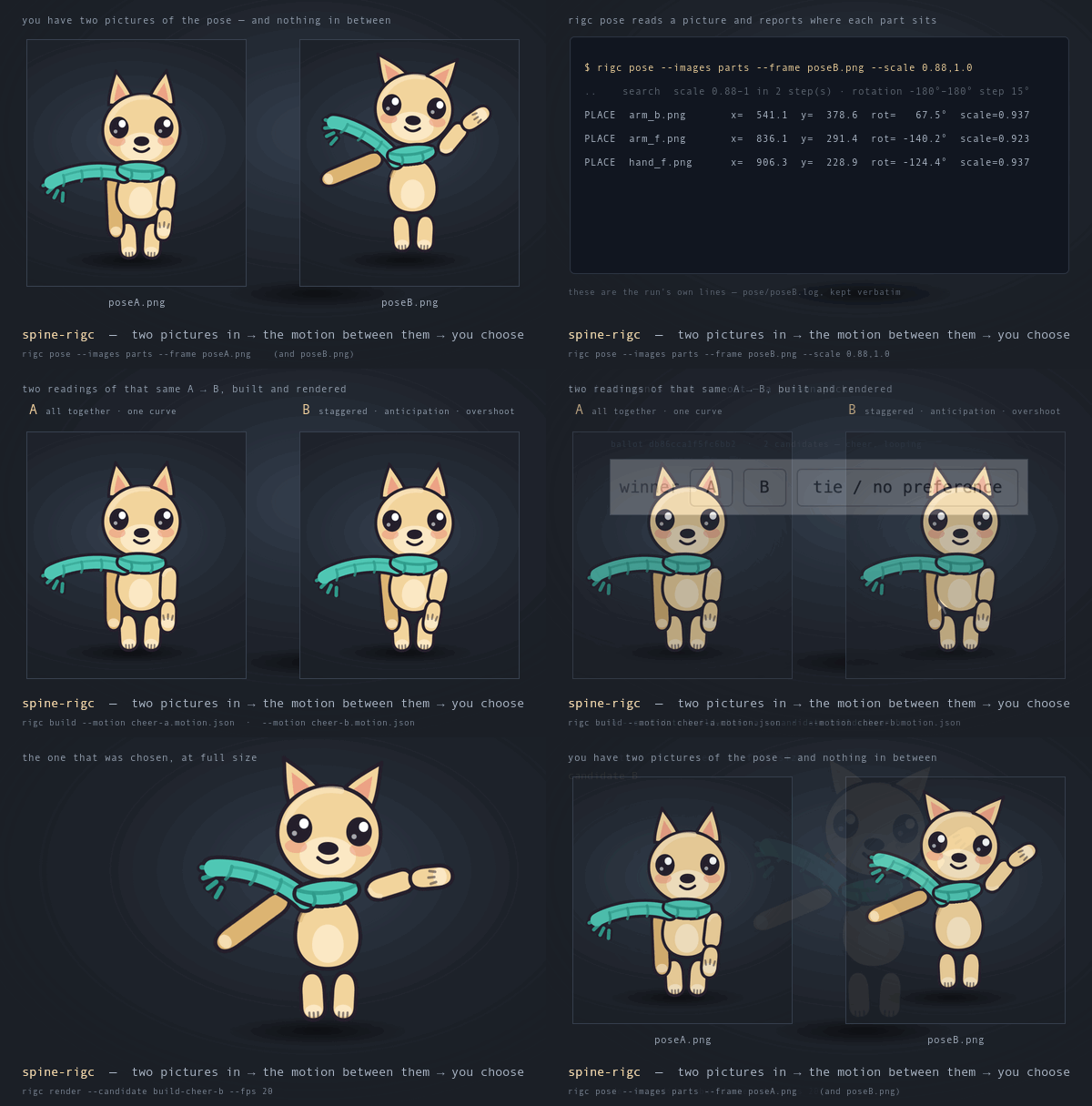
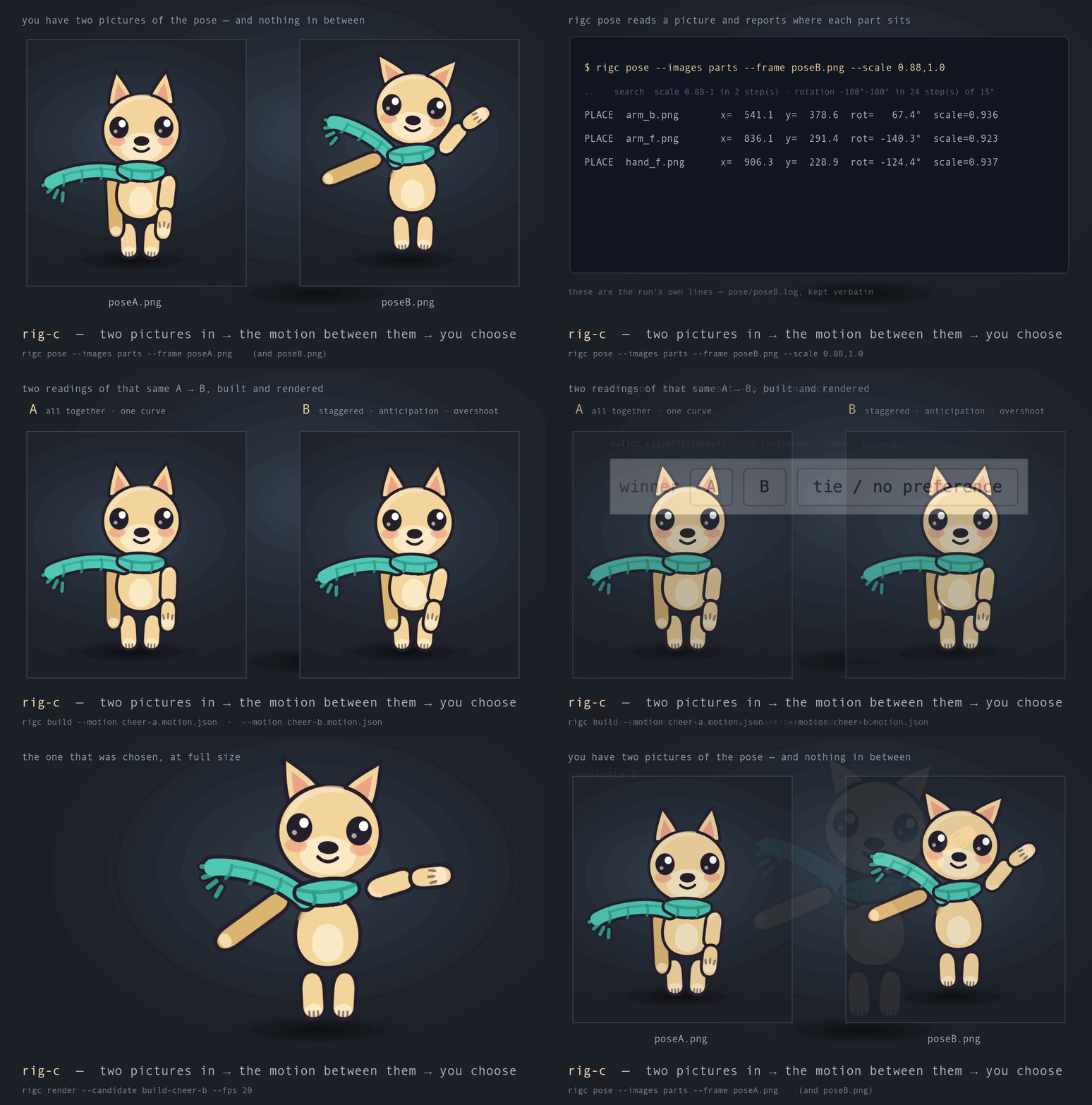
The whole loop on one character: two key poses are the given
conditions, rigc pose reads where every part sits in each picture, two
candidate in-betweenings are compiled from the same pair — and a real
rigc vote ballot picks the winner, because the movement between the poses
is the one thing no instrument here will grade. A 2x key-pose film (1200x810) sits beside it.
Three properties of vote are worth stating, because they are what make its ledger
usable by the next agent rather than by a reader: a tie is a recorded outcome, not a
missing one — both-unacceptable is the tie that means propose again, and it is
unreachable if ties are not recordable; the winner is a digest, not a label, since
B means nothing outside one ballot while a digest identifies the same pixels
anywhere; and every line carries a reason code from a closed enumeration that is
enforced, so "tie, because this one is better" is refused.
🎞️ Authoring the movement those pages show you — key poses, in-betweening, and how to spread candidates so a ballot informs — is the motion authoring guide.
📐 rigc pose --images parts/ --frame poseA.png runs the other way. Every command
above takes something you authored and tells you about it; this one takes a picture
the user already has — one key pose — and reports where each loose part PNG sits in
it, so those coordinates go into the rig and the motion by construction and the
effort goes into the part no instrument can measure: the movement between two poses.
A part that matches nowhere is refused by name, two near-equal placements are reported
as both, and nothing it prints is a score. Fields, the coordinate contract and the
limits: AUTHORING.md §11. The parts it refuses because
something is drawn over them are rigc chainfit's, once a candidate exists —
§12.
Each directory in gallery/ is
one rig spec, one motion spec and the PNGs they name, small enough to read in one
sitting. Each stars a single feature, so how do I do X has a working answer rather
than a field table, and each README carries the frame rate it was authored at, what
was verified, and what writing it cost. Repository material: a clone and
bun install runs them.
| Example | Stars | What it is |
|---|---|---|
gallery/walk |
ik constraints + ik timelines |
Two two-bone leg chains solved to foot targets — the planted leg nailed down, the swinging one let go at the top of its lift |
gallery/squash |
deform timelines |
A ball squashed about its contact point and stretched along its travel, from two affine transforms the keys state rather than tabulate |
gallery/flex |
contour meshes |
A swallow-tailed banner and a serrated leaf: four meshes traced off their own alpha, waved by bone timelines and rippled by a deform |
gallery/ride |
path attachments + path constraints |
A trolley coasting down a drawn rail and rolling back, driven by a position timeline, with groups + stagger keying the wheels and the ears |
gallery/portrait |
deform transform + derive group tracks |
A 2.5D head turn: two meshes and six feature bones all keyed from one stated expression, dx = x(cos t − 1) − z·sin t, with the depths in the spec rather than a README |
gallery/nod |
the pitch and wave transform kinds |
A head bowing and two lop ears rippling, on three meshes each laid out for the closed form that moves it — a fold angle solved for before authoring, and a shear whose winding no amplitude can reverse |
gallery/look |
slider constraints |
A head that turns because a value says so: two dials drive two sliders, and the rendered animation moves the needles rather than the face — with a depth map under the face mesh, a soft mask on the cowlick, and a slider range derived from the turn ceiling build reports rather than picked by eye |
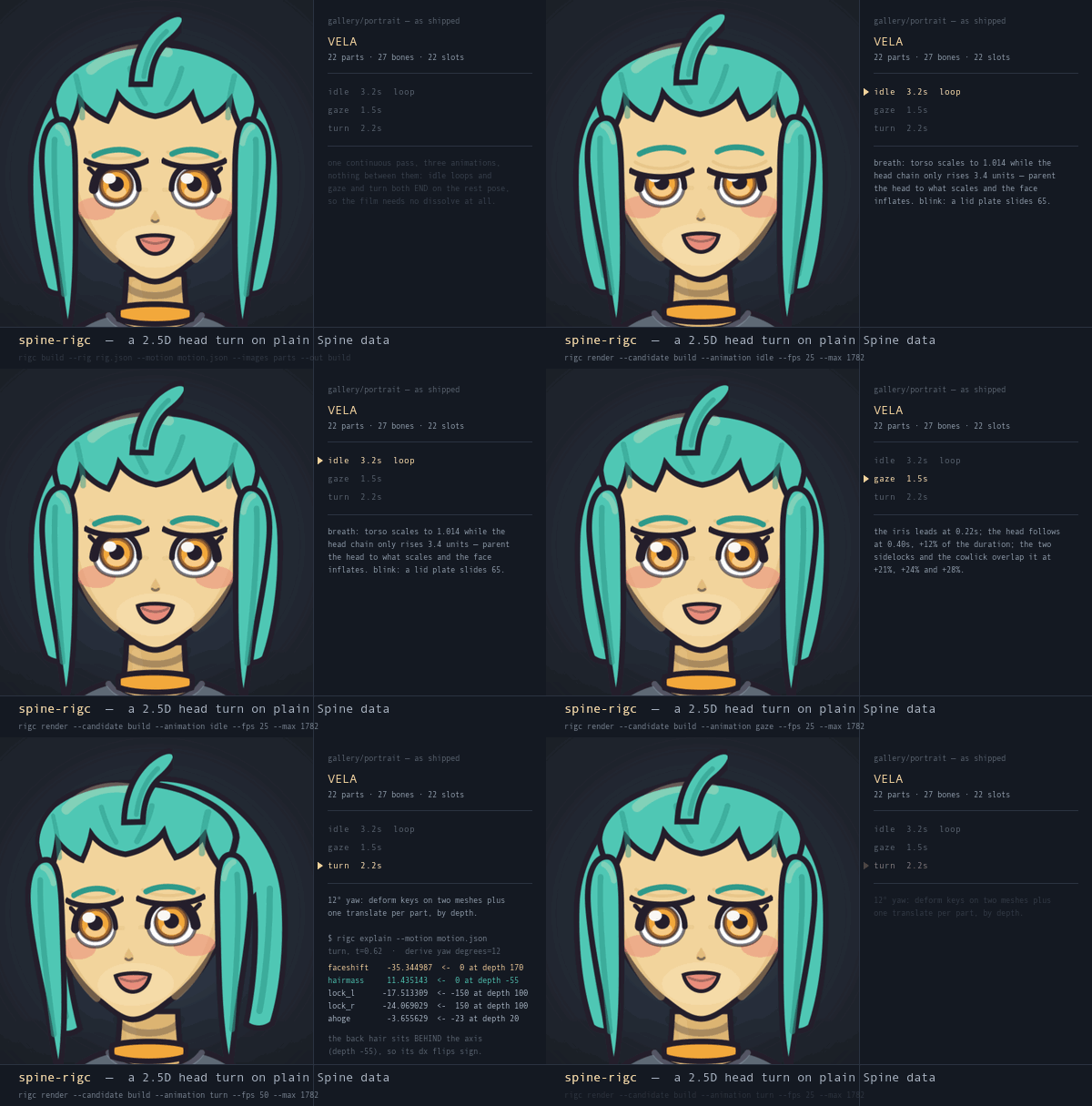
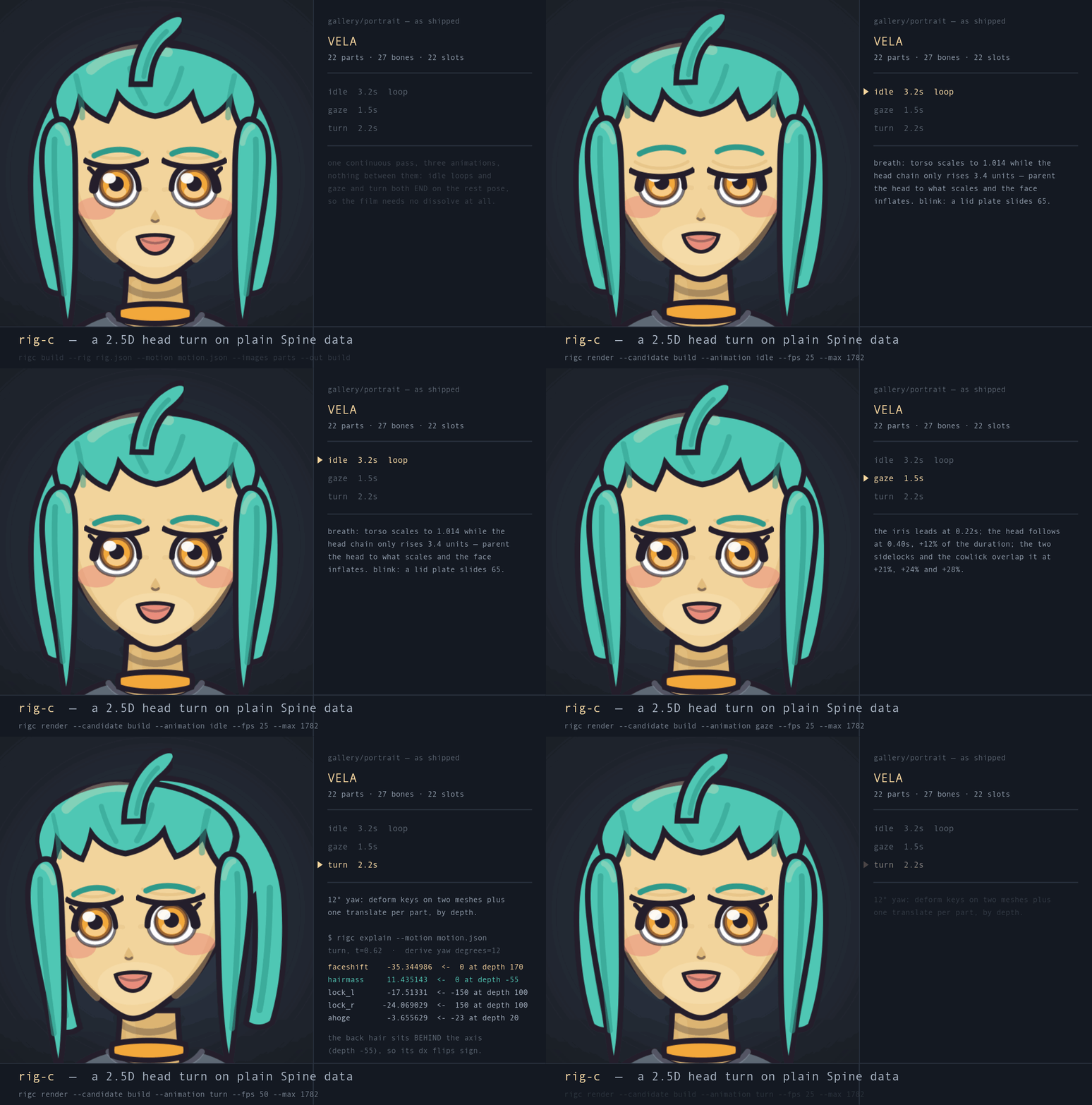
The portrait rig playing its three animations in one take — the turn is
the shot: both silhouette edges move apart, which a flat slide cannot do, because every
feature carries its own depth. The rig guarantees the seams — idle loops
while gaze and turn return to rest, so the hand-offs meet at 0
differing pixels — and the composing is the consumer's. Authorable on plain Spine 4.3, no
plugin, no runtime patch; what the turn costs is authoring rather than runtime capability,
and that cost is one stated expression per key. Compiled and rendered entirely by the
published package. A 2x portrait film (1200x810) sits beside it.
🎞️ How the three films on this page were made is kept with them, one directory per
film in films/ — a run.sh that
names every step, the assembler that cuts the shots and draws the type, and a README
saying what the film claims and which tool printed each figure on screen. Repository
material, like the gallery: a clone runs them.
rigc help <command> prints the command’s flags; AUTHORING §0 is the CLI reference.
| Command | Does |
|---|---|
build |
Compile, gate and write the rig. build in the CLI reference |
validate |
Re-gate artifacts already on disk. validate in the CLI reference |
repack |
Repack a build from its output. repack in the CLI reference |
ingest |
Read a skeleton back into specs. ingest in the CLI reference |
split |
Separate disconnected mesh pieces. split in the CLI reference |
explain |
Print the compiled rig as a table. explain in the CLI reference |
render |
Write PNG frames and a contact sheet, or a named dial’s geometry-only parallax reading. render in the CLI reference |
preview |
Write a playable HTML preview. preview in the CLI reference |
vote |
Make a ballot and record its answer. vote in the CLI reference |
pose |
Read part placements from a picture. pose in the CLI reference |
chainfit |
Read occluded parts through a candidate rig. chainfit in the CLI reference |
diff |
Compare two skeletons structurally. diff in the CLI reference |
bonedist |
Measure per-bone world-transform distance. bonedist in the CLI reference |
check |
Compare a candidate against reference pictures. check in the CLI reference |
bench |
Run a rung of the benchmark ladder. bench in the CLI reference |
guide |
Read a named failure or guide section. guide in the CLI reference |
skills install |
Install the packaged agent skills. skills install in the CLI reference |
review |
Hand a build to the review package. review in the CLI reference |
For a skeleton you already have, the ingest-and-rebuild loop turns a Spine 4.3 export into rig and motion specs, then checks that rebuilding them reproduces it. For a licence holder, the editor round trip imports a build into the Spine editor and checks the export against that build with the gate, structural diff and rendered frames; it never runs in CI.
| Document | For |
|---|---|
| 📘 docs/AUTHORING.md | the format guide, and the one to read before writing a spec. Both input files field by field with a complete minimal example each, every field with its Spine meaning, the rules that decide what is emitted, the build → read the report → fix → repeat loop, the map from every named failure to the file that has to change, and the features rigc refuses by name so you do not spend a loop discovering them. It travels inside the npm package, at node_modules/@rig-c/core/docs/AUTHORING.md |
| 🦴 docs/RIGGING.md | authoring the hierarchy. Where a bone goes and why the art is pushed out on an offset, why a pivot in the wrong place looks like a search failure and what identifies one, moving a pivot and the child row that gets forgotten, gauges, siblings-not-a-chain, what a chain can reach and how many links it needs, why a local key is not a world key, duplicate art at mirrored pivots, and constraints as structure. Every section is a stumble the run records hold more than once, ranked by how often. Ships in the package too |
| 🎞️ docs/MOTION.md | the key-pose recipe. How to get two poses, what a pair of poses does and does not fix, the in-betweening rules and where each comes from, and how to spread candidates so a ballot informs. Ships in the package too |
| 🙂 docs/FACE.md | authoring a face. A blink, a gaze and a 2.5D head turn on plain Spine data: the one line of yaw arithmetic every number in a turn comes from, depth as the parameter you are actually authoring, where to put a grid's columns and the angle at which any grid folds, what foreshortens and what does not, channel allocation before the first key, and the three cliffs with their angles. Also the deform audit gap, demonstrated — a folded mesh gates green — and the differential check that works today |
| 📥 docs/INGEST.md | working with a skeleton you did not author. What every command can and cannot do with a foreign skeleton.json, reading it with the toolchain, transcription as the route that makes it yours, what each validator complaint means on an export, and the re-pivot/rename/extend recipes. Ships in the package too |
| 🤖 docs/PROMPTING.md | handing the authoring to an AI agent — the prompt clauses a measured pilot run paid for, and what you can leave unsaid. Ships in the package too |
| 🔬 docs/SPEC_COVERAGE.md | the Spine 4.3 format, field by field. Every key the 4.3 JSON parser and atlas reader take, what each defaults to, and the parser line it comes from — the rows rigc's refusals cite by part number. Ships in the package too |
| 🎓 the benchmark dossier | why you can trust the output. The yardstick, diff and check and what neither can see, the eight-rung ladder and the spineboy graduation exam, the run viewer, the 50 named assertions with their profiles, and the selftest that has watched every one of them fire. Repository material — it is not in the npm package |
| 📋 LADDER.md · GATE.md · PILOT.md | the live rung ledger, the clause statements a candidate is graded against, and how to run an agent through the ladder and score what comes back |
| 🧬 GENERATIONS.md | Spine data from another generation. Why a 3.8–4.2 file read as 4.3 fails in silence, the policy that follows (detect from skeleton.spine, never guess, play on the matching runtime), what A16 and ingest do with such a file, and the editor as the migration path. Repository material |
| 📓 CASES.md | converting a Live2D model to Spine, and verifying the conversion. The method — the source's own player headless, parts from its texture along the drawables, motion baked as deform keys, reference frames first, check — run once end to end on two Live2D sample models with no editor and no converter, and verified against the source's renderer and Spine's own runtime: the three instruments, the two rigc defects verifying it led to and v1.2.1 fixed, and where the method stops. Figures only — the models' licence keeps every asset out. Repository material |
| 🗺️ ROADMAP.md | where this is going, and where it has been. What 1.0 had to mean before the number was claimed, and what it was claimed on — conditions rather than a feature list, because direction here comes from what users hit |
| 📐 CLAUDE.md | the doctrine — why the validator's messages are the product, why nothing reaches disk before green, why no number is ever invented, and what a change has to keep. the contribution guide calls it worth ten minutes before a first patch. Repository material |
rigc is measured against Spine's own official example projects — the
1-weight-and-mass … 8-follow-through series as a difficulty ladder, with spineboy
as the graduation exam.
🎓 The ladder is complete. All eight numbered rungs and the spineboy graduation exam are cleared and hold under the current gate, v2.4, every clause PASS or SKIP: worst attributable slot drift 5.5550 px against a 6.0 px bar — a 1.0801× margin, the thinnest of the ladder's G2 figures, and G5's 1.0376× is thinner still — and 0 of 124 frame-change disagreements. Recompiling the same spec in a different session reproduced every field of the measurement record to the digit. The rungs stay in place as regression gates.
Rung 7 clears on a read-down. One of its three slots draws in every set and is attributable in none; a read-down names the framing of its evidence, and a slot whose attributability is measured to be capped below the bar reads down when everything observable about it is independently verified strict. Every other rung and the graduation exam pass on the clause itself. Recompiling a stored candidate reproduces its record to the digit within one gate; across an instrument change the digits move, and the gate re-inspection ledger records where. The standing figures quoted above are from its gate-v2.4 re-inspection, which is the current sweep.
🧪 A separate series measures that harder question, and it has not been kind. From-zero attempts at spineboy — no inherited specs — have landed at 18.2, 18.8, 19.57, 7.86, 9.33 and 18.98 px worst drift against the 6.0 px bar, a spread with no monotone trend and every figure above the bar. They move no rung and reopen nothing — a from-zero run is a tooling-progress measurement rather than a re-climb, which is why the certification above is scoped to tool + guide + protocol. One of those attempts states the residual in its own words: "in motion it is not at editor quality." All six, with their verdicts, are in the from-zero attempt records.
The whole dossier — the yardstick, diff and check and what neither of them can
see, every rung, the run viewer, the 50 assertions and the selftest behind them — is
docs/BENCHMARK.md.
Live rung status is
recorded in the ladder ledger.
Issues are the ledger; see CONTRIBUTING.md for what a change has to clear before it lands. Releases are cut by release-please — RELEASING.md.
See NOTICE.md for licensing and third-party terms.