Log the active window (title + app name) to CSV on startup, then on window changes or mouse movement since the previous sample. Cursor positions are not stored; the two legacy coordinate columns stay empty. CSV quoting preserves commas, quotes, and embedded newlines.
This can be used to analyze how you spend your time on your computer.
Prebuilt downloads:
- Windows x86_64
- Linux x86_64 (X11 and GNOME Wayland)
- macOS Apple Silicon (no Intel Mac binary)
Mouse movement tracking requires access to /dev/input/event* on both X11 and
Wayland, usually through membership in the input group:
sudo usermod -aG input $USERLog out and back in for the group change to take effect.
If your distribution uses another group for /dev/input/event*, use that group instead.
Active window detection requires the x-win GNOME Shell extension. On startup,
work_log installs it if missing and refreshes outdated compatibility metadata or
incomplete installations in ~/.local/share/gnome-shell/extensions/x-win@miniben90.org.
The bundled extension declares support for GNOME 42–50.
After installation or an update, log out and back in, then enable it:
gnome-extensions enable x-win@miniben90.orgRestart work_log afterwards. Updating the files does not reload the extension in
the running GNOME session. At subsequent logins, work_log waits up to 18 seconds
for the extension to become available.
Upgrades across GNOME 45 may require reinstalling the extension even when its
metadata looks current. Move the extension directory above to a backup location
outside gnome-shell/extensions, restart work_log, then log out/in and enable
the extension as described above.
The application needs the following permissions in System Settings > Privacy & Security:
- Accessibility for mouse movement tracking.
- Screen & System Audio Recording (called Screen Recording on older macOS versions) for window titles. Without this permission, app names may be logged while window titles remain empty.
Enable these permissions for the terminal or application running work_log, or for work_log itself if running independently (for example, via autostart). Fully quit and restart the affected application or work_log after granting permissions.
On older macOS versions, these settings are under System Preferences > Security & Privacy > Privacy.
Download the latest release for your platform from the releases page.
On Linux and Windows, extract the archive to a permanent folder.
On Apple Silicon Macs, opening the .dmg mounts a temporary work_log disk in
Finder. Copy the executable to a permanent folder (for example, a Tools folder
in your home directory), then eject the work_log disk. Run the copied file from
Terminal, for example: "$HOME/Tools/work_log" --help. Starting with 1.2.0-beta.3,
Mac releases are Developer ID signed and notarized. Grant the macOS permissions
described above before logging.
Usage: work_log [OPTION]...
Log the active window on window changes or mouse movement to a CSV file.

Options:
  --frequency=SECONDS  set the logging interval (positive; default: 2.0)
  --file=FILE          set the file to write to (default: ~/work_log.csv)
  --stdout             print to stdout instead of a file
  --autostart-install  install the program to run at startup.
    (options are preserved, do not move the executable afterwards)
  --autostart-remove   remove the program from startup
  --help               display this help and exit
Run ./work_log (.\work_log.exe in PowerShell) from its folder to append to
work_log.csv in your home directory. Stop it with Ctrl+C.
To enable logging at login, run ./work_log --autostart-install from the permanent
copy, adding any desired options such as --file=/path/to/log.csv. After an upgrade
or moving the executable, rerun this command to refresh the autostart entry.
On macOS, autostart installation rejects paths/options containing &, <, ]]>,
carriage returns, or XML-invalid characters. Use another path or run normally.
The CSV has no header. Its five fields are timestamp (RFC 3339), app name, window title, and two empty legacy coordinate fields:
2025-02-10T14:11:27+01:00,Editor,my-project,,
2025-02-10T14:11:29+01:00,Editor,my-project,,
2025-02-10T14:11:31+01:00,Browser,"Report, Q4",,
Logging is best effort: failed file writes are reported to stderr and not retried. Keyboard input alone does not produce records; this is not a continuous activity or session-duration measurement.
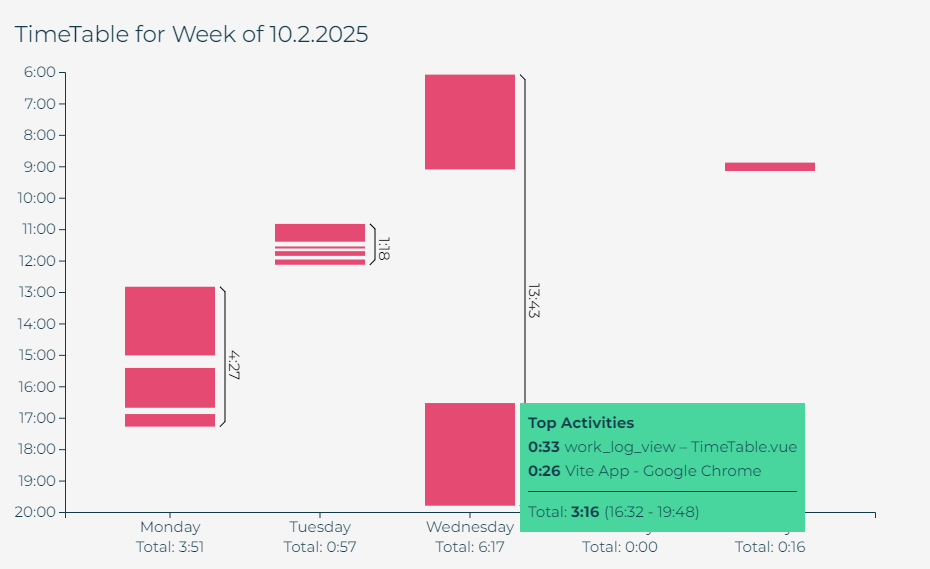
The resulting CSV can be analysed by work_log_view - just drop the CSV in your browser window and get your result: