
Integrated Universal Monitoring and Telemetry System
Offline-first temperature, humidity and pressure monitoring for the Raspberry Pi Pico W


SIMUT is IoT firmware for the Raspberry Pi Pico W that monitors temperature, humidity and pressure on up to 16 sensors, and keeps working with or without a network. One source tree builds three published devices:
- a touch-panel monitor (320×240 TFT);
- a character-LCD monitor (16×2, the alpha);
- a battery logger that hibernates between readings (the Air, experimental).
They share one core:
- binary on-device history and per-channel alarms;
- 32 user accounts with 13 permission bits;
- an embedded web interface;
- telemetry over HTTP(S) or MQTT(S), with a separate line for alarms;
- Home Assistant MQTT Discovery, a Prometheus
/metricsendpoint and remote syslog (RFC 5424); - over-the-air updates and a serial console.
| Current release | v2.8.0 (2026-09-30). SIMUT left beta with v2.7.0, on measurements: an 8.18 h soak with 0 reboots, and 6 of 6 over-the-air updates with nothing lost. v2.8.0 keeps the configuration when an update is cut off halfway, and lets the custom telemetry format send the Content-Type its server expects; v2.7.4 had fixed a sensor scan that left a BMP280 on hardware I2C in error. |
| Published images | Three images, each as .uf2 and .bin: release (TFT touch panel), alpha (16×2 LCD with a Bluetooth console) and air (headless battery logger). The pt-BR and es-ES language packs and an OTA manifest ship alongside. An image with a different set of features comes from the build configurator, and CI builds it from main. |
| Maturity |
|
| Tests | Every pull request runs 489 host test cases in 9 suites, 60 s of fuzzing and static analysis, and builds all seven firmware images from a cold cache. Behaviour on real hardware is verified on a bench — see Verification. |
Known limitations. Each one is documented where it applies.
- Updates. An update over the air reformats the filesystem:
- Wi-Fi, accounts and sensor slots are carried across. History, calibration files and language packs are not, so the web page downloads a backup before it starts, and restoring it brings them back.
- There is one firmware slot and no rollback. A bad flash is recovered with BOOTSEL and a USB cable.
- Setup access point. While the setup access point is up, the device stops reading sensors, checking alarms and recording history, and since v2.7.1 it opens by itself: on a unit with no network configured, and after about 68 min without the network. A fix is in review (#204).
- Unexplained resets. A watchdog reset (
ctx=209orctx=455) appeared three times on the test image on 20–21 September and not since; the one caught with its context had Core 0 in the console (ctx=209). Both cores are now instrumented to explain the next one. Actx=455(empty trace) on the first boot afterpicotool load -xis not this: that reboot goes through the watchdog, and the record appeared after 11 of 11 such flashes and after none of 7 hardware resets (2026-09-30). - Idle connections. During the v2.7.0 soak, 7.1 % of responses on an idle keep-alive connection arrived cut short. The device drops a stream it cannot send for 4 s.
- Chunked replies. Read in a tight loop, 0.15–0.6 % of
/api/statusreplies arrive with their chunked framing broken (#189). The device does not restart and the next request works; the page misses one update. - User list. Every save of the user list reboots the device, about 25 s each time.
- Telemetry cursor. The cursor is a single timestamp, so a record stamped out of order on flash is skipped: 6 of 75,778 records in one measurement.
- Not a certified instrument. SIMUT is not a certified metrological instrument. Validate it against your own reference before relying on it for regulated storage.
| Need | DIY Arduino sketch | ESPHome / Tasmota | SIMUT |
|---|---|---|---|
| Standalone with display | Manual coding | No TFT support | Built-in touch UI, or a 16×2 LCD |
| Regulated environments | No audit trail | No user RBAC | 32 accounts, per-account panel PIN, a persistent event log and remote syslog |
| Cold chain (probes down to −50 °C) | Basic readings | Basic monitoring | Calibrated multi-sensor, maintenance windows |
| Offline operation | Yes | Often cloud-dependent | Full local web + display |
| OTA updates | Manual reflash | OTA | OTA + backup/restore |
| Security | None | Basic | HMAC-SHA256, 13-bit RBAC, lockouts, optional HTTPS |
| Home Assistant | Manual setup | Native | MQTT Discovery (opt-in) |
| Prometheus metrics | None | Built-in | /metrics endpoint |
| Remote audit log | None | Add-on | Syslog (RFC 5424 / UDP) |
SIMUT is for you if: you need a standalone, secure, auditable temperature monitoring system that works with or without internet — typical in laboratories, pharmacies, blood banks, vaccine storage, and food cold chains.
ESPHome/Tasmota may be better if: you don't need a local display and prefer YAML configuration over a built-in web UI. (If what kept you there was Home Assistant: SIMUT speaks MQTT Discovery.)
┌──────────────────────────────────────────────────────────┐
│                    Raspberry Pi Pico W                   │
│  ┌──────────────────────┐  ┌────────────────────────────┐│
│  │      Core 0          │  │        Core 1              ││
│  │  (Main Loop)         │  │  (Display Loop)            ││
│  │                      │  │                            ││
│  │  ◆ AppManager ───────┼──┼─ state/snapshots ──────┐   ││
│  │  ◆ SensorManager     │  │  ◆ DisplayManager ◄────┘   ││
│  │  ◆ WebManager        │  │  ◆ TouchPriority           ││
│  │  ◆ TelemetryManager  │  │  ◆ DMA canvas renderer     ││
│  │  ◆ CommandManager    │  │  ◆ Themes                  ││
│  │  ◆ StorageManager    │  │  ◆ i18n (EN/PT/ES packs)   ││
│  │  ◆ NetworkManager    │  │                            ││
│  └──────────┬───────────┘  └────────────────────────────┘│
│             │                                            │
│  ┌──────────┴──────────────────────────────────────────┐ │
│  │  Hardware Interfaces                                │ │
│  │  ◆ SPI → ILI9341 TFT 320×240 + XPT2046 Touch        │ │
│  │    (alpha: HD44780 16×2 LCD · Air: no display)      │ │
│  │  ◆ GP0–GP15 → 16 universal sensor slots:            │ │
│  │      DS18B20 (1-Wire) · DHT22 · BMP280/BME280 (I2C) │ │
│  │  ◆ USB CDC → serial console (+ Bluetooth: alpha/Air)│ │
│  │  ◆ WiFi (CYW43439) → HTTP(S) server + telemetry     │ │
│  └─────────────────────────────────────────────────────┘ │
└──────────────────────────────────────────────────────────┘
         │                   │                   │
    ┌────┴────┐          ┌───┴────┐         ┌────┴───────┐
    │ Sensors │          │ Web UI │         │  Telemetry │
    │ DS18B20 │          │ Browser│         │ HTTP(S) /  │
    │  DHT22  │          │ (RBAC) │         │  MQTT(S)   │
    │ BMx280  │          └────────┘         └────────────┘
    └─────────┘
| TFT dashboard | TFT history graph | Web dashboard | Early alpha |
|---|---|---|---|
 |
 |
 |
 |
Every display screen, captured off the real panel framebuffer: docs/images/screens/screens.md.
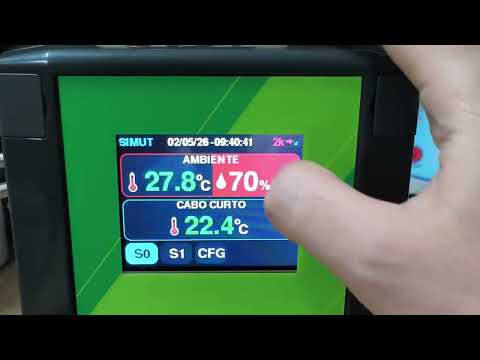
The early alpha video shows the first TFT + touch prototype — the UI has been redesigned since.
| Component | Specification |
|---|---|
| MCU | Raspberry Pi Pico W (RP2040, dual-core) |
| Display | release: ILI9341 320×240 TFT (SPI, DMA-driven) · alpha: HD44780 16×2 character LCD (4-bit) · air: none |
| Touch | XPT2046 resistive touchscreen (release) |
| Sensors | 16 universal slots on GP0–GP15 — any mix of DS18B20 (1-Wire), DHT22 and BMP280/BME280. A BMx280 is I²C and takes two pins; two of them can share a pair (0x76/0x77) |
| Buzzer | Passive piezo (PIO-driven) — not on the Air |
| Storage | 2 MB internal flash (1 MB firmware slot + 1 MB LittleFS) |
See the wiring guide for the complete pinout and connection diagrams.
SIMUT PCB — layout available for download — the KiCad board design (
.kicad_pcb,.kicad_sch) lives inPCB_test/, and the ready-to-fab package (Gerbers + PTH/NPTH drills, no paste layers) is published as a public release: simut-pcb-v1.1 —simut_pcb_fabrication.zip.
- 16 universal sensor slots — GP0–GP15. Each slot takes a DS18B20, a DHT22 or a BMP280/BME280; a BMx280 is retyped automatically from its chip ID. Type and pins are assigned at runtime, with no recompile.
- Temperature, humidity and pressure as first-class channels.
- Calibration — per-sensor offsets and curves of up to 5 points per channel, linear or smooth.
- Sensor validation:
- DS18B20 ROM verification, with a swapped probe quarantined until the right one returns;
- error hysteresis: 3 failures to enter, 5 successes to leave;
- out-of-range readings rejected.
- Alarms on every channel:
- low and high limits per channel;
- a fault alarm that fires even when a sensor's limits are off;
- a 120 s silence and a global mute;
- buzzer melodies and visual feedback on the display.
- Maintenance windows — per sensor, up to 30 days, set from the panel or by a server. While one is open, alarms are suppressed, and the window's start and end are reported as
maint_on/maint_off.
- 320×240 ILI9341 touch panel — dashboard, history graphs with a min/max band, statistics, calendar, settings.
- Identity at the panel — the operator picks an account, then types that account's PIN:
- 32 accounts, each with its own PIN;
- a configurable PIN policy: minimum length, 1–3 glyphs per key, digits or 0-9A-Z;
- a keypad that is re-dealt after every tap;
- a lockout per account: the sixth failure locks the account, and 20 failures in total lock the panel.
- Administration on the glass:
- a Users item creates accounts and sets their permission bits and PINs;
- the 13 settings rows are filtered by what the account may do;
- Settings → 12 starts the setup access point;
- Settings → 13 sets the date and time, and a unit with no network configured asks for them at the end of the boot.
- Top-panel gestures — a tap toggles min/max, a 3 s hold pins the selection.
- DMA rendering fast path — canvas compositing over 62.5 MHz SPI.
- 4 px safe area everywhere — the screen-alignment offset (±4 px per axis) can never crop content.
- Themes — up to 8 loaded from LittleFS (11 ship in
data/themes/); the editor intools/theme-editor/previews on a live device. - Sound system — Touch, Confirmation, Error, Alarm and Attention classes, 6 melodies each, with separate system and alarm volumes.
- Readings — cycles every active slot and channel every 3 s, with big digits for temperature and humidity and an
S<n>tag naming the slot. - Setup access point — shows the address, the SSID and the key, scrolling long values.
- Bluetooth console — see the security note under Environments.
- Pending telemetry — with a single sensor, the bottom-left corner shows the pending telemetry count (
N, orNkfrom a thousand up), and the Wi-Fi icon fills left to right.
-
11 pages — gzip-compressed (zopfli) in flash, with light and dark themes that follow the system preference, a file manager, and multi-user sessions that expire after 15 minutes idle.
-
Live panel mirror (
release) — the panel's current frame in the browser, 213 ms per frame. A click on it is a touch on the glass. -
Changes say what they cost — three buttons:
- Test: applied, not saved;
- Apply now: saved, no reboot;
- Save and restart.
The device classifies each change with a dry run before the page offers them.
-
Restart without saving — a button at the bottom of the Configuration page restarts the device and drops whatever the page has not saved; the saved configuration is what comes back.
-
Version on the login page — the firmware version shows under the name before anyone signs in.
-
Wi-Fi scan — pick the network from a list, even from inside the setup access point.
-
History graphs and CSV export in the browser — the page downloads the raw binary day files, then decodes, buckets (min/max/mean) and exports them itself. The recent, unsealed hour comes from
/api/history/open. The chart renderer is embedded — no CDN. -
HTTP API — 62 routes. Each one is either gated by a permission or public by design, and CI checks it.
- Four transports — HTTP, HTTPS, MQTT and MQTTS:
- payloads in JSON, CSV or a custom template;
- TLS 1.2 (ECDHE with AES-GCM), with the server certificate checked against an uploaded
/cert.pem.
- Batching by quantity:
t_intis the minimum batch: the radio stays off until that many records wait (0 = off);t_batis the maximum per request, a ceiling that free memory can lower;- the batch size adapts to successes and failures, and the server's response time paces the next one.
- A second line for alarms:
- alarm, fault and maintenance events travel in their own queue (32 by default, up to 64);
- each event leaves the queue only when the server acknowledges it (HTTP 2xx or an MQTT ack);
- each carries the name of the account that acted.
- Integrations — Home Assistant MQTT Discovery (opt-in), Prometheus
/metrics(session or HTTP Basic), and remote syslog (RFC 5424 over UDP). - Fleet hooks:
X-SIMUT-*identity headers on uploads;- on the
releaseimage, an mDNS_simut._tcpservice with id, version, image and TLS in its TXT record; - Bearer tokens and a configurable CORS origin.
-
Wi-Fi that reconnects itself:
- a retry ladder: 5 s, doubling to 120 s, then dormancy and a new round;
- hidden SSIDs and signal-quality checks;
- static IP, two DNS servers, a custom NTP server or a manual clock, and a configurable web port.
-
Setup access point:
- named
<device name>_SETUP—simut_SETUPfrom the factory; - WPA2, with a per-device key shown on the USB console and the TFT boot screen;
- a captive portal at
http://192.168.4.1.
It opens only when someone asks. A unit whose network is away keeps measuring and keeps retrying it. Three ways in:
- Settings → 12 on the panel;
- the
apconsole command (USB, or Bluetooth on the alpha and the Air); - a 3 s hold on the panel during boot.
- named
-
NTP — the retry backoff grows from 20 s to 15 min, with a fallback to
pool.ntp.org. Until NTP syncs or someone sets the clock, a provisional clock is seeded from the newest stored record. The panel marks it with?between the date and the time, and the first set after the boot, by NTP or by hand, corrects the history blocks that boot started.
- Compact binary history (V5) — delta + anchor encoding at 5.38 bytes/record, about 116 days in the 1 MB filesystem (11 channels at a 1-minute cadence, measured on bench files on 2026-07-31):
- blocks of 60 records, each with its own CRC;
- the open block is saved after every record;
- past 86 % full, the oldest day is deleted.
- Configuration — CRC32-checked, written to a temporary file and renamed, with a
.bakfallback. Secrets are obfuscated at rest, not encrypted: physical access to the flash is outside the threat model (SECURITY.md §3). - Event log — 2 × 800 records and 155 event codes:
- routine events are persisted on state changes, with an hourly heartbeat and a count of what was suppressed;
- security, configuration and fatal records are never filtered.
- Accounts and permissions:
- 32 accounts, 13 permission bits;
- nobody can grant a bit they do not hold;
- backup, restore, OTA and certificate install require the full-admin mask.
- Passwords:
- HMAC-SHA256, 5000 rounds, an 8-byte hardware-random salt per user and a board-bound pepper;
- a factory-fresh unit generates a random 8-character admin password, prints it once on the USB console and forces a change at the first login.
- Brute-force limits:
- login lockout from 2 s to 300 s per client, with
429once every lockout slot is taken; - per-IP throttling on the heavy routes;
- the Bluetooth console has its own exponential lockout and stops advertising 5 minutes after boot.
- login lockout from 2 s to 300 s per client, with
- Sessions — an
HttpOnly; SameSite=Strictcookie (Secureover HTTPS), or a Bearer token. - Uploads — path traversal, percent-encoding, control bytes and reserved names are refused, and
/configis out of the file manager's reach. - Optional HTTPS (
release) — install the certificate pair withPOST /api/tls. TLS 1.2, ECDHE with AES-GCM. - Audits — the audits of 2026-08-16, of v2.3.6-beta and of 2026-09-07 are closed. The last finding, V-09 (a restricted account could create one with more bits than it held), was fixed in v2.7.0, and both it and the 2026-09-07 fixes were verified on hardware. See SECURITY.md.
- Crash autopsy on every boot — the watchdog scratch registers name the stalled module on each core. Since v2.7.0, three more records also persist Core 1's module, the free heap and the uptime at the stall.
- Dual-core flash discipline — Core 1 is paused around every flash write (measured, not assumed).
- Watchdog discipline — the watchdog is fed around every filesystem operation, so slow HTTP clients cannot starve the loop.
- OTA from the web page:
- admin only;
- the image is checked before it is committed (size, boot2 CRC, image variant) and again on the next boot;
- Wi-Fi, accounts and sensor slots are carried across, and the rest of the filesystem is reformatted, so the page downloads a backup first;
- the device is back in under a minute: 52–56 s in the v2.7.0 campaign.
- Backup & restore — the whole filesystem in one file, CRC32-checked and bound to the chip.
- Recovery guide — BOOTSEL, picotool and 1200 bps paths for every failure mode.
- Two modes, no display, no buzzer:
- M0 is awake: web, console, Bluetooth and sensors;
- M1 is the cycle: sleep on the RTC alarm, wake, read, write history, and sleep again.
- The radio only when it pays — it comes up only when
t_intrecords are waiting. A reading wake takes 9.31 s with a DS18B20, and with a 60 s interval the device is awake about 13 % of the time. - Charger pin — a charger-detect pin (GP17 by default) keeps it awake while powered.
- Full console — the only published image with the full console.
- 3 interface languages — English built in; Portuguese (pt-BR) and Spanish (es-ES) come as
.lngpacks on the filesystem. A device runs English plus the one pack installed.
- PlatformIO (Core 6.x or later)
pip install zopfli— optional; the web pages compress 2,888 B smaller with it, and the flash budgets are measured with it- Raspberry Pi Pico W
- No local toolchain?
docker compose run buildbuilds in a container — the path CONTRIBUTING.md recommends for new contributors
# Clone the repository
git clone https://github.com/angeloINTJ/simut.git
cd simut

# Build firmware
pio run -e pico_w_release

# Flash to Pico W (auto-reset via 1200 bps touch; BOOTSEL works too)
pio run -e pico_w_release -t upload

# First flash only: upload LittleFS data (language packs, themes, favicon).
# Warning: uploadfs reformats the LittleFS partition — on a device already in
# service it destroys history, config and calibration. Never run it again
# after the device has data; language packs can be uploaded later from the
# web file manager instead. It copies both language packs, and the device
# loads the first alphabetically (es-ES): delete the one you do not want.
pio run -e pico_w_release -t uploadfs
Prefer not to build? Every release ships simut_vX.Y.Z_release.uf2, _alpha.uf2 and _air.uf2 (drag-and-drop with BOOTSEL held), the matching .bin for over-the-air updates, and the pt-BR and es-ES language packs. An image with a different set of features comes from the build configurator.
-
Capture the admin password. A factory-fresh unit prints a random 8-character admin password once on the USB serial console (115200 baud). It is never stored in plain text. If you miss it,
system admin reset confirmover USB prints a new one. -
Join it to your network. The setup access point opens when you ask for it: type
apon the console (on the Air, afterenable), or use Settings → 12 on the touch panel. From v2.7.1 to v2.8.0, a unit with no network configured opened it by itself; it no longer does.- Join
<name>_SETUP(simut_SETUPfrom the factory). It is WPA2, and its per-device key is in the reply toap, on the USB console and on the TFT's boot terminal. - The portal opens at
http://192.168.4.1. - The device keeps measuring while the access point is up; only telemetry and syslog wait for the network. v2.7.1 to v2.8.0 read no sensors, checked no alarms and recorded no history while it was up.
Without a screen, you can use the console instead:
system ssid <name>,system pass <secret>, thenreload confirm. The console stops at the first space, so a network name or password with a space has to go through the web page.With no network configured, the unit asks for the date and time at the end of the boot, because without a network there is no NTP: the touch panel opens a date-and-time screen (SKIP leaves it, and Settings → 13 sets the clock later), and every image prints
No network, provisional clock: conf time YYYY-MM-DD HH:MM:SSon the console. That command works on every image's console, over USB or Bluetooth: on the alpha and the Air, which have no panel, it is how the question is answered. The web page's Date & Time section sets the clock too. - Join
-
Open the web interface at the address the device got — on the
releaseimage alsohttp://simut.local— and log in asadminwith the password from step 1. You will be asked to choose a new one. -
Add sensors in Config → Sensors & GPIO, or let Scan for probes find them.
-
On the touch panel, Settings asks for an account and its PIN. The factory admin PIN is
1234, and it must be changed on first use.
simut/
├── src/                    # Firmware source (C++17)
│   ├── main.cpp            # Entry point
│   ├── AppManager*         # Application state machine, boot, alarms, Air cycle
│   ├── DisplayManager*     # TFT panel and alpha LCD (Core 1), touch, themes
│   ├── WebManager*         # Web server, HTTP API, sessions, OTA, TLS
│   ├── StorageManager*     # LittleFS, config, accounts, history files
│   ├── SensorManager*      # DS18B20 / DHT22 / BMx280 drivers
│   ├── NetworkManager*     # Wi-Fi, reconnect ladder, setup AP, mDNS, NTP
│   ├── TelemetryManager*   # HTTP(S)/MQTT(S) telemetry and the alarm line
│   ├── CommandManager*     # Serial and Bluetooth console
│   ├── LogManager*         # Event log and crash forensics
│   ├── HistoryV5.*         # V5 history codec
│   ├── air/                # SIMUT Air configuration
│   ├── display/            # Keypads, fonts and labels shared by the displays
│   ├── sensors/            # Channel table, calibration curves
│   ├── ota/                # Update staging, validation and applier
│   └── SystemDefs*.h       # System constants and limits
├── data/                   # LittleFS assets (language packs, themes, favicon)
├── PCB_test/               # KiCad PCB design + Gerber/DRL fabrication files
├── test/                   # Native unit tests (Unity), nine suites
├── tools/                  # Build gates, bench suites, PicoHand, release scripts, theme editor
├── docs/                   # Documentation + GitHub Pages site
├── WebUI.h                 # Web UI source (gzipped into src/WebUI_GZ.h at build)
├── AGENTS.md               # Bench manual: flashing, the Air, measuring (Portuguese)
└── platformio.ini          # Build configuration
| Environment | Purpose | Published |
|---|---|---|
pico_w_release |
Production image for the TFT panel: emergency console, HTTPS server, mDNS | …_release |
pico_w_alpha |
16×2 character LCD (HD44780), no touch; emergency console + Bluetooth console | …_alpha |
pico_w_air |
Experimental — SIMUT Air: headless, no buzzer, hibernation cycle (M0 awake / M1 wake-read-send-sleep); full console + Bluetooth. See §17 of the user manual | …_air |
pico_w_test |
Bench image: the full console for the test suites; no HTTPS, no mDNS | — |
pico_w_test_https |
pico_w_test plus the HTTPS server, for TLS validation; three of its pages are served from LittleFS to fit |
— |
pico_w_asserts |
Release + concurrency assertions | — |
pico2_w_release |
The release compiled for the Pico 2 W (RP2350), so CI sees it build. Not run on a board yet | — |
eight native* envs |
Host-side unit tests — see Testing | — |
Security note for
pico_w_alphaandpico_w_air: both compile the Bluetooth SPP console in (SIMUT_BLUETOOTH=1), so on those two images it is live attack surface. It is authenticated by the admin web password, with an exponential lockout that survives a reconnect, and a discovery window that closes 5 minutes after boot. Recovery commands are restricted to USB.The setup access point is WPA2 on every image, with a per-device key shown on the console and, where there is one, on the display. See SECURITY.md §2 and §8.
There is no debug environment.
pico_w_debugwas removed in v2.4.1 after never once linking: at-Ogthe image overflowed the 1020 KB app slot by ~100 KB. Flash is tight. The release image uses 96.4 % of the 1,044,480 B program slot (tools/flash_budget.jsonkeeps the measured value), and CI checks every.bin, with its 241 B signature, against the 1,040,384 B over-the-air ceiling. A GDB target would have to be built by cutting features. For the concurrency tripwire on hardware, usepico_w_asserts.
-Os— optimize for size-Wall -Wextra, and-Werroronsrc/(third-party libraries are not held to it)-specs=nano.specs— newlib-nano for smaller binary-DNDEBUGon every image- LTO is disabled (toolchain limitation with earlephilhower Arduino-Pico)
- The framework is pinned to arduino-pico 5.6.1 and patched by
tools/arduino_pico_overrides/patch.sh
A serial console is available over USB (115200 baud), and over Bluetooth SPP on the alpha and the Air.
-
The emergency console runs on the
releaseandalphaimages. Its 15 commands:show net status,show system info,show system logdebug on|offsystem admin reset,system format,system factory,system https offsystem ssid <name>,system pass <secret>,system cors <origin|off>ap,time <date> <time>,reload,help
Destructive commands ask for
confirm, and the four recoveries (system factory,system format,system admin reset,system https off) are refused over Bluetooth. -
The full Cisco-style console (
enable/configure terminal) runs on theairimage and thepico_w_testbench images — see the CLI manual (in Portuguese). The Air addsair status | hibernate | stop | idle <sec> | charger <gpio|off>.
Where configuration happens:
- The web interface is the day-to-day tool.
- The touch panel covers what an operator needs at the device: themes, alarms, sounds, language, their own PIN, users, the PIN policy, touch calibration, display offset, status, the setup access point and the date and time.
The device exposes a REST API at http://<device-ip>/api/:
- 62 routes — 52 gated by a permission, 10 public by design, 0 ungated, checked by
tools/check_authz.pyin CI; - the route table is in the user manual;
- docs/AUTHORIZATION.md maps each route to its permission;
- docs/API_POST.md documents the POST bodies.
pio test -e native             # validators, telemetry cursor, labels, parsers (197 cases)
pio test -e native_history_v5  # V5 history codec (63)
pio test -e native_cli         # CLI parser (33)
pio test -e native_logpolicy   # edge-triggered log persistence, autopsy bands, touch wake (57)
pio test -e native_alarmqueue  # alarm telemetry queue (47)
pio test -e native_network     # Wi-Fi reconnect state machine (36)
pio test -e native_air         # SIMUT Air persistent config (16)
pio test -e native_sensors     # sensor type table (13)
pio test -e native_otasig      # OTA image signature check (27)

# V5 codec reference checks (Python vs C++, 20k random cases)
python3 tools/check_history_v5_parity.py --cases 20000
python3 tools/history_v5.py --selftest --trials 200000Every push and pull request to main runs four jobs:
- gates — the host suites plus these checks:
- secret scan, log-code tables, authorization matrix;
- licence consistency, filesystem guard, Air consistency;
- history day-merge tests.
- firmware — all seven images, built from a cold cache:
- each is checked against its flash budget and the over-the-air ceiling;
- the build itself enforces
-Werrorand the web UI, CLI help, log-code, channel-table and language-pack gates.
- fuzz — 60 s of libFuzzer against the web-API validators, with contract oracles.
- static analysis — cppcheck, at a pinned version.
main is protected: nine of these checks must pass before anything merges, every job except the pico_w_test_https image.
The bench:
- a Pico W with the TFT panel and touch;
- a second Pico, the PicoHand, which works the target's RESET and BOOTSEL lines, times its awake/asleep line and fakes a charger (see AGENTS.md, in Portuguese);
- bench suites in
tools/for the web API, the panel, telemetry, OTA, Wi-Fi outages and the Air cycle.
What has been measured on real hardware, latest first:
| Date | What | Result |
|---|---|---|
| 2026-09-30 | Release candidate (v2.8.0) | Web suite 87 passed, 0 failed; update from the published v2.7.4 over the air: the configuration file identical byte for byte except the version, five sensors reading, the .bkp restored 67 of 72 files identical (the other five expected to differ); an upload cut at 400 kB, then a reset: configuration intact; 10 min without a restart; Air and alpha updated over the air from v2.7.4 with their configuration (the Air's own options back from the .bkp) |
| 2026-09-30 | An upload cut, then the filesystem filled (v2.8.0) | Same starting flash, upload cut at 400 kB, nothing changed, the filesystem filled to 100 % and emptied, reset: before #195 the device came back on factory defaults, after it with its configuration. The same cut on v2.7.3, without the filling: factory defaults (#192) |
| 2026-09-30 | Custom telemetry Content-Type (v2.8.0) | Collector on a PC: the header received matches the field for application/x-ndjson, text/csv and application/json; charset=utf-8; empty sends application/json; the JSON format ignores the field; bad value, aplicação/json and json are refused at save |
| 2026-09-26 | Release candidate (v2.7.4) | Web suite 87 passed, 0 failed; all five sensors across the three families; after a sensor scan the BMP280 kept reading for 90 s (before the fix it failed about 10 s after); a rehearsed commit of the sample interval answers "reboot":false; 10 min without a restart |
| 2026-09-26 | The alpha's 16×2 LCD (v2.7.4) | On an HD44780 wired in parallel: the boot screen with the version and its progress bar, the connected screen with the IP, then each sensor in turn with its slot and the Wi-Fi level |
| 2026-09-25 | Configuration page and login page (v2.7.3) | Restart without saving, on the release image and on the test build: offline 3.3 s after the click, back at 26.4 s, and a name edited but never saved did not survive the restart. The login page shows the version in both themes; 9 pages, 0 script errors |
| 2026-09-24 | Panel: PIN security and setup mode (v2.7.2) | The footer arrows stay on the screen (v2.7.1 closed it); an unsaved tap no longer changes the stored policy; Confirm shows the network, the key and 192.168.4.1 (v2.7.1 stayed on the confirmation, AP already up) |
| 2026-09-23 | Air clock across the sleep (v2.7.2) | Stamps within −0.085 … +0.030 s over 10 wakes (v2.7.1 lost 0.8 s per wake); the NTP correction fell from 9–10 s to 0.08 s |
| 2026-09-23 | Long telemetry queues on the Air (v2.7.2) | 0 invalid bodies; 13,681 of 13,682 records delivered awake, 13,670 of 13,671 hibernating (v2.7.1: 68 of 69 bodies were invalid JSON) |
| 2026-09-22 | v2.7.0 soak | 8.18 h, 0 reboots; the largest free heap block moved −42 B |
| 2026-09-22 | v2.7.0 over-the-air updates | 6 of 6 applied; 57 files restored, 0 records missing |
| 2026-09-22 | Setup access point (v2.7.1) | A client joins in 4.1 s, on release and on alpha with Bluetooth live, also with a randomised MAC. The automatic fallback opens after 6–7 min without a network (removed on 2026-10-01) |
| 2026-09-22 | V-09 fix | 10 of 10 verdicts, with positive controls |
| 2026-09-21 | Collector down for 3 h 58 min | 237 records queued, 0 reboots; drained in one round with 0 missing, plus 25 alarm-line records |
| 2026-09-21 | Web suites | 67/67 as admin, 87/87 as a restricted account; 500 flash-writing commits, 0 reboots |
| 2026-09-21 | Wi-Fi scan | 18 of 18, 0.94 s per sweep, also from inside the access point |
| 2026-09-20 | Panel accounts, PINs and policy | 32/32 |
| 2026-09-19 | Panel mirror | 613 → 213 ms per frame; pixel-exact against the framebuffer (0 of 76,800 differ) |
| 2026-09-11 | Power cut during an update | Only the ~25 s apply window leaves the device needing BOOTSEL |
| 2026-08-10 | History across resets | 10 of 10 hardware resets and 10 of 10 reboots lost 0 records |
Two things on the 16×2 LCD have not been on glass: the single-sensor layout, with its pending telemetry count (the bench has five sensors), and the access-point pages, which by the code the LCD does not reach.
| Document | Description |
|---|---|
| User manual | Hardware setup, display/web/console guide, OTA, API reference, troubleshooting — kept current |
| Manual do usuário (pt-BR) | The same manual, in Portuguese |
| Complete manual (pt-BR) | The full product manual in Portuguese, updated for v2.8.0: 31 chapters on installation, configuration, daily use and server integration. Screenshots are being recaptured; each missing one is marked where it belongs |
| Wiring guide | Complete pinout and connection diagrams |
| Over-the-air updates | Updating from the web page, and what survives it |
| Recovery guide | Brick recovery — BOOTSEL, picotool, 1200 bps reset |
| CLI manual | Full console reference, the Air's included (in Portuguese) |
| Authorization matrix | Every HTTP route and the permission it requires |
| Security policy | Threat model, credential handling, incident response |
| Documentation index | Which documents are kept current and which are snapshots |
| Changelog | Version history and feature changes |
Contributions are welcome. Read CONTRIBUTING.md for the development setup, the code conventions and the pull request process.
All contributors must follow the Code of Conduct.
- Bug reports: GitHub Issues
- Feature requests: GitHub Issues
- Security vulnerabilities: See SECURITY.md — do not open a public issue
- Questions: Open a discussion or issue
Thanks to everyone who has contributed:
 Ângelo Moisés Alves 💻 📖 🎨 🔌 🛡️ 🚧 |
 Lorenzo Longaretto 🧪 💻 |
 John Martin 🚇 💻 |
 f p 📖 |
 Mike 💻 🧪 📖 |
This project follows the all-contributors specification.
Is your product or project using SIMUT? Add this badge to your README, documentation, or product page:
[](https://github.com/angeloINTJ/simut)
Large version (for presentations, posters, or product packaging):
[](https://github.com/angeloINTJ/simut)
MIT License — see LICENSE for details.
Copyright © 2026 Ângelo Moisés Alves