
This repo assembles PostHog context for AI agents and LLMs into Agent Skills-compliant packages. Check out /context for details.
Need output in a different format? No problem. Let us know in #team-wizard-and-docs, or fire up a PR to augment the /context and /scripts directories with your preferred transformation.
Have a skill you want to make sure is maintained and distributed via the wizard?
We'd love your pull request!
The context mill gathers up-to-date content from multiple sources, packaging PostHog developer docs, prompts, and working example code into versioned skills which can be shipped anywhere as zip files.
The PostHog wizard downloads skills and menus from the latest release. The PostHog MCP server fetches the skills-mcp-resources.zip bundle and exposes it to any MCP-compatible client as resources. The AI plugin packages skills from here too.
The context mill is a stopgap. The goal is to retire it once the docs themselves package cleanly into skills. See the handbook.
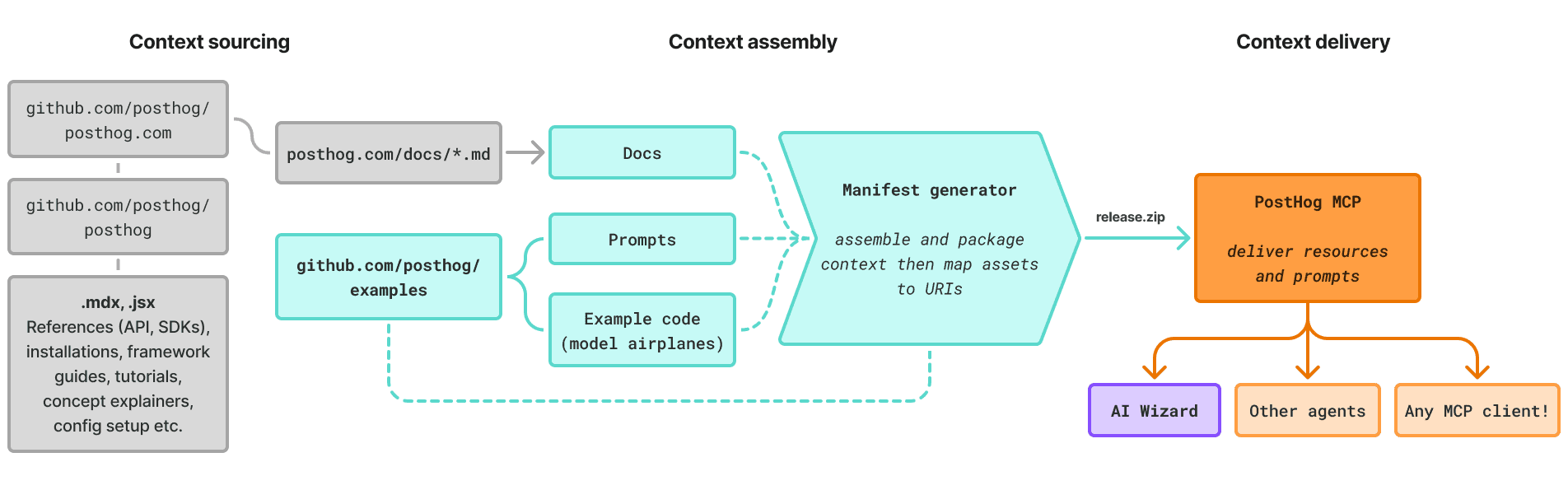
The context mill effectively acts as a context engine, an assembly line for turning disparate PostHog knowledge into something portable, something AI systems can reliably consume.
You can break its context engineering flow into three main stages.
1. Context sourcing: The context mill pulls from the entire PostHog developer docs, with pages delivered from posthog.com as raw Markdown. It also includes curated, hand-crafted prompts and working example apps.
2. Context assembly: The context mill transforms and packages the sourced context into zip files and menus, which is meant to be portable and self-contained. We can structure and shape them however we need.
3. Context delivery: The context mill creates a versioned GitHub release, mirrored to context-mill.posthog.com, which any agent or MCP server can consume as skills or resources.
We've got live, working example code that demonstrates PostHog in action. You can run these yourself to see events flow into your PostHog project.
These are more like model airplanes. They're dramatically simplified to make it easy to see PostHog in action. You shouldn't use these as starter projects or put them into production. The authentication is fake!
But the leanness makes these useful for agent-driven development. Use these as context to help your agent make better integration decisions about PostHog.
example-apps/
├── android/                                # Android (Kotlin)
├── angular/                                # Angular
├── astro-hybrid/                           # Astro, hybrid rendering
├── astro-ssr/                              # Astro, server-side rendering
├── astro-static/                           # Astro, static output
├── astro-view-transitions/                 # Astro with View Transitions
├── django/                                 # Django
├── elixir/                                 # Phoenix (Elixir)
├── expo/                                   # Expo (React Native)
├── fastapi/                                # FastAPI
├── flask/                                  # Flask
├── flutter/                                # Flutter
├── go/                                     # Go (net/http)
├── java-spring-boot/                       # Spring Boot (Java)
├── javascript-node/                        # Node.js (Express, server-side)
├── javascript-web/                         # Plain JavaScript, browser
├── laravel/                                # Laravel
├── next-app-router/                        # Next.js 15 with App Router
├── next-pages-router/                      # Next.js 15 with Pages Router
├── nuxt-3-6/                               # Nuxt 3.6
├── nuxt-4/                                 # Nuxt 4
├── php/                                    # Plain PHP
├── python/                                 # Plain Python
├── react-native/                           # React Native
├── react-react-router-6/                   # React with React Router 6
├── react-react-router-7-data/              # React Router 7, data mode
├── react-react-router-7-declarative/       # React Router 7, declarative mode
├── react-react-router-7-framework/         # React Router 7, framework mode
├── react-tanstack-router-code-based/       # TanStack Router, code-based
├── react-tanstack-router-file-based/       # TanStack Router, file-based
├── react-vite/                             # React with Vite
├── ruby/                                   # Plain Ruby
├── ruby-on-rails/                          # Ruby on Rails
├── rust/                                   # Rust (Axum)
├── sveltekit/                              # SvelteKit
├── swift/                                  # Swift (iOS)
├── swift-xcodegen/                         # Swift with XcodeGen
├── tanstack-start/                         # TanStack Start
├── vue-3/                                  # Vue 3
└── wordpress/                              # WordPress
Run npm run build to generate the release artifacts:
| Output | Description |
|---|---|
dist/skills/<id>.zip |
Per-skill bundles (SKILL.md + references + shared docs) |
dist/skills/manifest.json |
Versioned manifest of every bundled skill and its download URL. It ships inside skills-mcp-resources.zip, not as its own release asset |
dist/skills/skill-menu.json |
Category groupings and cliEntries — the wizard's command lookup table |
dist/agents/agent-menu.json |
Orchestrator flows and the task prompts in each one |
dist/skills-mcp-resources.zip |
One bundle of manifest.json and every skill ZIP, for the MCP server |
Releases are cut as GitHub releases and mirrored to context-mill.posthog.com.
The wizard fetches skill-menu.json and agent-menu.json from the latest
release and downloads the per-skill ZIPs on demand. The MCP server fetches
skills-mcp-resources.zip.
The manifest describes the built skills — one resource per skill, with id,
name, description, tags, uri, and a downloadUrl pointing at the
GitHub release asset. Each bundled skill contains a SKILL.md, references/
step files, and any shared docs pulled from posthog.com at build time.
Add numbered step files to context/skills/<skill>/references/ using the
convention <n>-<name>.md with next_step: frontmatter pointing to the next
file. The build script discovers, orders, and bundles them automatically.
Skills in this repo declare how they surface as wizard commands via a cli:
block in their config.yaml. That mechanism — role, parentCommand,
command, flat vs. family — is documented in
CONTRIBUTING.md.
The CLI was overhauled to consolidate commands into a smaller, extensible surface. If you (or your agent) knew an older command, here's where it went:
| Old command | New command | What changed |
|---|---|---|
wizard integrate |
wizard (default flow) |
Command removed; the default flow runs the integration |
wizard events-audit |
wizard audit events |
Now an audit-family subcommand |
wizard audit (single audit) |
wizard audit <subcommand> |
Now a family — see the audit subcommands below |
wizard audit-3000 |
removed | Retired |
wizard revenue |
wizard revenue-analytics |
Renamed (old revenue removed) |
wizard upload-sourcemaps |
wizard upload-source-maps |
Renamed; upload-sourcemaps still works as an alias |
audit is the one family today whose subcommands are skills from this repo:
| Subcommand | Backing skill |
|---|---|
wizard audit events |
audit-events (the default leaf) |
wizard audit all |
audit |
wizard audit autocapture |
audit-autocapture |
wizard audit feature-flags |
audit-feature-flags |
wizard audit identify |
audit-identify |
wizard audit session-replay |
audit-session-replay |
wizard audit web-analytics |
(wizard-native, not a skill in this repo) |
Commands vs. skills: those audit subcommands are skills, promoted to commands via
cli: role: command. A skill withrole: skillis reachable only throughwizard skill <id>. Same machinery, two surfaces — sowizard audit <subcommand>picks an audit area, it does not take a skill name.
Commands vs. programs:
integratewas the command; the program behind it isposthog-integration, which still exists and powers the default flow. The program id is internal — it was never a command you typed.
Reviews are auto-requested via .github/CODEOWNERS — the
file is the source of truth; this table just mirrors it for readability. The
handbook
explains who owns what. team-wizard-docs is the default reviewer and owns the
build; the team-owned skills below route review to their owning team instead.
| Path | Owning team |
|---|---|
* (everything else, including all other skills) |
@PostHog/team-wizard-docs |
context/skills/integration/, context/skills/integration-v2/, context/agents/integration-v2/ |
@PostHog/team-growth |
context/skills/migrate/, context/skills/audit*/, context/skills/events-audit/ |
@PostHog/team-fde |
context/skills/error-tracking/, context/agents/error-tracking/, context/skills/error-tracking-upload-source-maps/, context/skills/error-tracking-link-releases/ |
@PostHog/team-error-tracking |
context/skills/revenue-analytics/, context/skills/web-analytics/ |
@PostHog/team-web-analytics |
context/skills/data-warehouse-source/ |
@PostHog/team-warehouse-sources |
context/skills/self-driving/ |
@PostHog/team-self-driving |
context/skills/mcp-analytics/ |
@PostHog/mcp-analytics |
context/skills/metrics/, context/agents/metrics/ |
@PostHog/team-apm |
context/skills/replay-vision*/, context/agents/replay-vision/ |
@PostHog/team-replay |
context/skills/ai-observability/, context/skills/llm-analytics/ |
@PostHog/team-ai-observability |
Ownership is by directory. Skills not listed above (creating-product-tours,
feature-flags, logs, omnibus, posthog-best-practices, quack,
tools-and-features, tracing) fall through the default and are owned by
team-wizard-docs. Today CODEOWNERS only auto-requests review — approval is
not a merge gate.
Before we ship any skills, we run them through the warlock, PostHog's security scanner for agentic flows. It reads the built skill bundles and looks for prompt-injection attempts and other risky content that could trick an agent downstream. An LLM triage pass then sorts the real threats from the false positives, so we're not chasing noise.
CI runs this automatically on every build and release, so most of the time you don't have to think about it. But if you want to check something locally:
pnpm security-scan:skills            # scan all built skill ZIPs (this is what CI runs)
pnpm security-scan path/to/file.md   # scan a specific file
Heads up, the skills scan reads from dist/, so run pnpm build first. If a scan flags something, fix the flagged content before releasing :)