
Room to think. Space to connect.
Some thoughts need more than one conversation. PCS brings AI conversation, revisable memory, reading, notes and planning into a workspace you own. Bring an unfinished question, a difficult passage or an idea. Work on it, keep where you stopped and what you want to try next, then come back with a place to begin.
Change the AI. Keep your continuity. Use a supported Local, Google, OpenAI or Meta connection while your saved conversations, memories and notebooks stay in PCS. Each model brings its own abilities; your workspace belongs to you.
Download for Windows · Release notes · Website · Discord · Report a bug
PCS 0.9.102 · Pre-release · Windows x64
Free and open source, with no PCS subscription or paid feature tiers. Cloud API usage is billed separately by the services you choose. Local models, AI runtimes and optional speech packs are separate downloads.
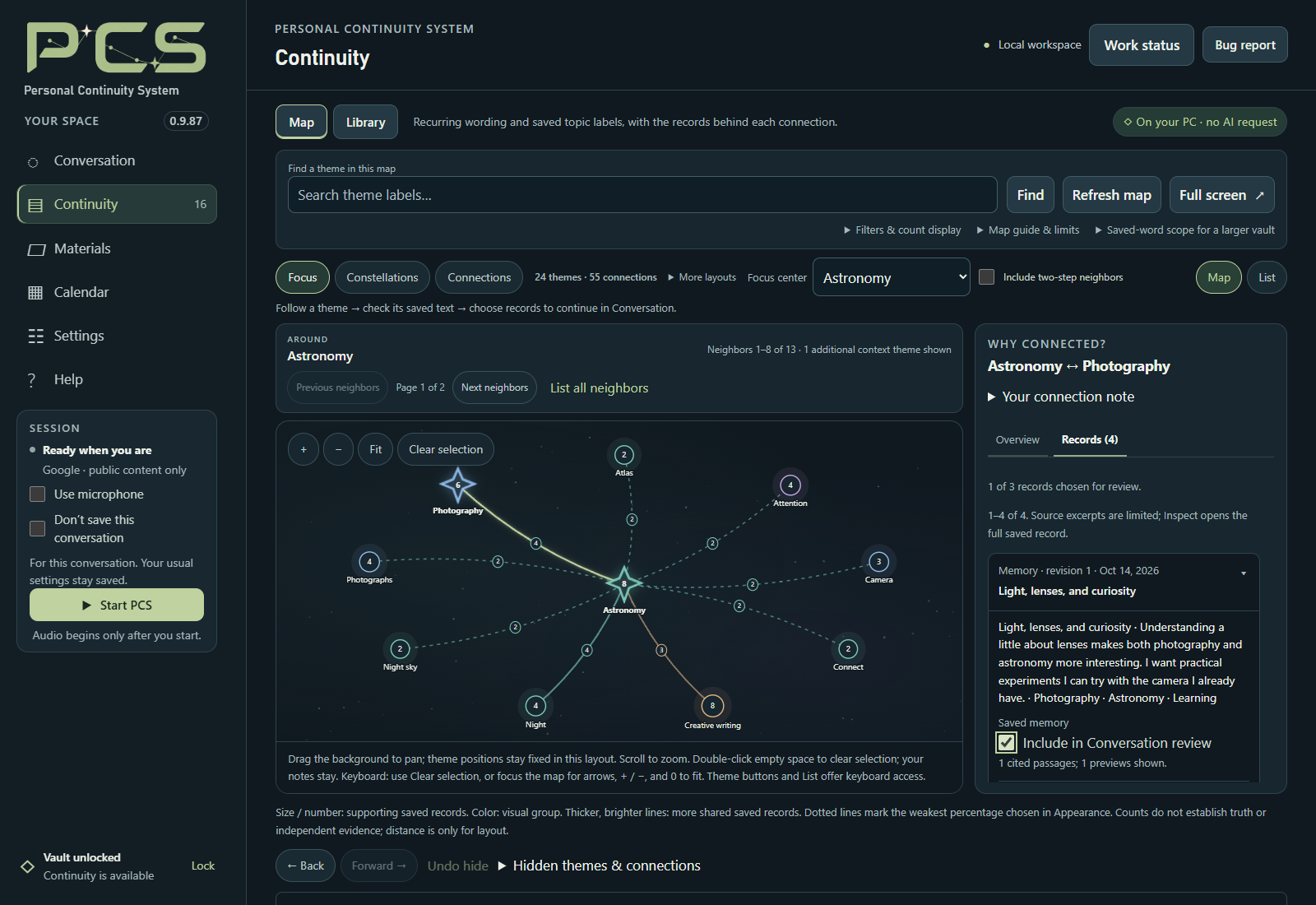
Fictional demonstration workspace from PCS 0.9.87. Inspect the saved words behind a connection and choose what to carry into your next conversation.
Start with conversation, then add the tools that help you continue.
| When you want to… | PCS gives you… |
|---|---|
| Think something through | Typed or spoken conversation, editable Companion direction and a choice of conversation pace. |
| Return to an earlier thread | Saved conversations and revisable memories, with source inspection, corrections and permitted recall. |
| Keep an unfinished thought | An encrypted Keep shelf with editable stopping points, next steps and pins. |
| Find a place to resume | A return card that prepares an editable draft from a thought you chose to keep. |
| Follow a connection | A Continuity Map with saved evidence, guided discovery and landmarks written in your own words. |
| Read and learn | Materials readers, Web snapshots, bookmarks, Read Along, notebooks, lessons and Practice. |
| Find your saved work | A searchable Library with Memories and Notebooks collections and routes back to their sources. |
| Plan your next step | Calendar tasks, goals and events, with reviewed quotations from work you kept. |
Manual reading, notes, Calendar entries and saved-record browsing work without starting an AI conversation.
Start with a question, decision, passage or idea that matters to you. Write in your own words and choose Start & send when ready.
If you would rather begin broadly, Build my starting map offers six optional opening questions. Preview the prompt, choose what to share, and skip or stop whenever you want. Your normal saving and learning choices apply.
Conversation pace offers Follow my lead, Think with me and Take the lead. Quiet and Stay here pause topic planning until you explicitly resume. Companion instructions are editable.
Local also offers an experimental, session-only option for a brief contribution during a quiet moment. It starts off and requires Take the lead. Preparing an idea can add processing time.
Choose Keep a stopping point beneath the message box. Give the thought a title, write where you stopped, and optionally add what you want to try next. Review it before saving to the encrypted Keep shelf.
Pin a thought to bring it forward when you return. Edit your note and next step, mark it resolved, reopen it or delete it when you choose. A kept PCS quotation retains its recorded wording and authorship separately from your own framing.
On a later visit:
- Unlock your vault and choose Load saved threads.
- Review the suggested stopping point, its sources and any changed-source warnings.
- Choose Review & continue to prepare an editable draft.
- Review the draft and decide whether to send it.
Loading the return card reads local records without a model request. Existing unsent text is protected.
After continuing a thought, a context strip keeps its title and next step available across Conversation, Materials, Continuity and Calendar. Explore in Map carries that thought into Map as a temporary reminder.
Saving conversation text and allowing memory formation are separate choices. With learning enabled, PCS can create model-written accounts linked to original passages.
Inspect the evidence, review earlier wording, correct an account in ordinary language or choose Forget. Your words, your corrections and model interpretations remain distinguishable.
Recall follows the sharing permissions you enable, and relevant corrections stay attached to the recalled material. Saved accounts and AI answers can still be incomplete or mistaken; inspect and revise what matters to you.
In 0.9.102, Local checks whether a question needs saved context before replying. Personal questions such as “Who am I?” can initiate recall without a separate instruction to remember. PCS also distinguishes failed or blocked lookups from completed searches with no matching result.
Help notice relevant memories in conversation, under Settings → Memory & sharing → Personal memory, offers small context hints when enabled.
- Local and Meta can receive matching cues for typed and completed spoken turns.
- Supported Google and OpenAI models can receive a small startup directory.
- Existing memory-sharing permission is still required.
- Hints are omitted when context space or eligibility cannot be established.
This setting starts off. It is separate from Local’s recall-initiation repair; enabling hints is not required for that repair to work.
The Continuity Map offers Focus, Constellations and Connections, with access to the saved records behind the display.
Choose Discover a connection to explore up to three existing connections. Inspect the evidence, try another connection, or Leave a landmark in your own words. Your landmarks help you return to a useful line of thought.
Map labels and counts describe saved material. They do not establish truth, personality traits or causes. You decide what a connection means to you.
In Continuity → Library, select a record and choose Explore connections. Add a question, review the proposed records, and choose which excerpts may be shared.
Jev can assess relevance, repetition, added information or possible disagreement within that reviewed set. Suggestions remain provisional and do not automatically create memories or change the Map.
This optional trial requires a TypeSafe key and separate sharing permission for each request. Ordinary Library browsing and Map exploration work without it.
Jev also has a separate conversation-carrying role that can choose among ideas proposed by your conversation model. That role starts off, has its own review, and requires additional cloud consent when used with Local.
Materials supports readable PDFs, EPUBs, Office and OpenDocument files, tables, slides, subtitles, HTML and common text/code formats.
Search a passage, keep a bookmark, listen through an available local voice, or review an excerpt before discussing it with your selected model. Compact browsing lists and larger detail areas leave more room for the material itself.
Notebooks hold notes, goals, lessons and source references. Practice can retain submitted answers and assessments when enabled. Optional research can find public evidence and prepare study notes.
Prepared reading notes and retained research notes remain distinct. Scanned documents need OCR elsewhere, and some Web pages cannot be captured. Extraction notices explain omissions.
You can also attach or drop a UTF-8 .txt or .md file and review it before choosing Use in this chat, Keep for later, or Save reviewed text in Materials. Saving in Materials creates an ordinary file outside the encrypted vault; back it up separately.
Reviewed quotations can be added to a Notebook, lesson or Calendar entry while preserving their original wording and authorship. Keeping a thought or creating a Calendar entry does not schedule automatic follow-ups or reminder delivery.
| Connection | What you need |
|---|---|
| Local on this PC | Compatible hardware, a supported model and verified runtime. The recommended Gemma/CUDA setup needs a compatible NVIDIA GPU. Experimental Custom GGUF setups have their own compatibility checks. |
| Google or OpenAI | Your provider API key and access to a compatible model. Supported routes include cloud audio as well as text. API usage is separate from consumer chat subscriptions. |
| Meta | Your Meta API key and account access. Typed conversation needs no local language model or speech pack. Voice uses local transcription and Windows or Kokoro speech. |
| Experimental Alibaba Qwen | Its region/workspace setup and API key. This route is voice-only and has a smaller feature set. |
Conversation, memory processing and reading preparation can use separate supported providers.
Local conversation and memory have no cloud AI fallback. For offline use, download the required components first, select Local for the roles you need, and leave online tools and cloud preparation off.
Separately enabled services still send information outside your computer:
- Brave lookup sends public queries and page requests.
- Local + Jev sends separately reviewed conversation information to TypeSafe.
- Library exploration sends its separately approved saved excerpts to TypeSafe.
- Cloud preparation uses the provider and sharing choices selected for that role.
Typed Local conversation needs no listening pack. Optional English microphone input, Windows or Kokoro speech, local semantic search and compatible OBS vision can be added separately.
Windows Radeon Vulkan text and the Ubuntu source preview remain experimental. macOS is not currently included.
PCS 0.9.102 brings together the work from 0.9.89–0.9.102:
- More natural personal and project recall, with clearer lookup failure notices.
- Optional memory hints that respect corrections, sharing choices and available context.
- More relevant screen use: Local supplies an available frame to the reply only when needed.
- Map discovery, owner-written landmarks and an Explore in Map route from a resumed thought.
- Roomier Materials and Library views, refreshed Help and optional Jev Library exploration.
- Search improvements and explicit retirement of an old provider index without deleting memories.
- Better protection for unsent drafts and more dependable Local Stop, Lock and Quit handling.
- Better retention of unchanged reviewed settings, optional thinking sound and clearer OpenAI transcript display.
See the release notes for the full changes, performance observations and testing limits.
- Open Releases and download PCS-0.9.102-Windows-x64.zip. Extract the complete ZIP into a fresh writable folder.
- Open Start PCS.exe. The first launch prepares its bundled Python environment offline; no system Python installation is needed.
- For a new workspace, use Quick Setup to create your vault and choose a connection. Keep the passphrase safe. Existing users: restore an encrypted backup before creating a new vault.
- Enter your Google, OpenAI or Meta API key, or follow Local model & files to install the required Local components. Review your saving and sharing choices.
- Microphone use starts off in a new setup. Once the vault is unlocked, type a message and choose Start & send. Add voice, Materials sharing, Vision and optional tools after that works. Experimental Qwen requires voice instead.
- When you reach a useful stopping point, choose Keep a stopping point and review what you want to retain.
The package includes START_HERE.md, a full Getting started guide and searchable offline Help.
Keep the application files together: the launcher verifies the package manifest. Use Quit PCS when finished; closing the browser tab alone can leave the application running.
- Saved continuity lives in your local encrypted vault. Original Materials files, imported text copies and readable exports are outside that encryption.
- Cloud features receive the information allowed by their controls. Don't save controls PCS retention; it does not prevent the selected provider from receiving the conversation.
- Corrections and forgetting affect PCS records and dependent saved work. They cannot retract information already disclosed or erase earlier backups.
- PCS cannot recover a lost vault passphrase. Changing it affects the working vault; existing backups keep their original passphrases.
- Stop, Lock and Quit PCS are separate controls: end the connection, close vault access, or shut down the application.
Before upgrading, create an encrypted vault backup, copy original Materials files separately, and quit PCS.
Extract the update into a fresh folder. Open Start PCS.exe and choose Restore an encrypted backup instead before creating a vault. Check the backup, review its counts and restore it. Follow the included restore guide to reconnect Materials and choose your automatic-backup destination again.
Keep your previous installation and pre-upgrade backup until you have checked the restored copy. Never run two copies against the same data folder.
PCS 0.9.102 introduces no new vault capability requirement. Existing saved-feature requirements still apply. Saving pin/next-step metadata or editing kept notes with those controls requires PCS 0.9.88 or newer to reopen that vault.
Check backup reports the minimum reader, and Help includes the complete compatibility table.
PCS is under active development. AI replies, memories, transcription and research can be wrong.
The final 0.9.102 candidate passed 13,896 Python tests and 3,210 JavaScript tests, with six documented platform exclusions. Fresh offline installation, browser checks, two launcher/lifecycle cycles, and independent package and delivered-file verification also passed.
Actual Local evaluation covered 11 fictional cases and 12 typed turns using Gemma 4 12B and synthetic images. These checks do not establish reliability for every model, personal vault, physical device or long conversation.
Use GitHub Issues or Discord for feedback. Include your version, connection, steps and expected result. Review diagnostics before sharing; exclude keys, passphrases, launch tokens and personal records.
This repository hosts project information and release downloads. Developers should download PCS-0.9.102-Source.zip from the release assets for the application source, tests and build support. GitHub’s automatic Source code archive contains this download repository.
The release also provides PCS-0.9.102-SHA256SUMS.txt for archive verification.
PCS first-party code is licensed under GPL-3.0-only, without warranty. Third-party components retain their own license terms.
See LICENSE, COPYRIGHT and third-party notices.
Optional contributions through Ko-fi help support development. Provider charges remain separate.