


-brightgreen.svg)





Modern, async-native Home Assistant integration for BTicino / Legrand MyHOME SCS bus systems connected via OpenWebNet IP & Serial gateways.
Maintained by the OpenWebNet-HA community organisation.
⚖️ Version Comparison • 🧪 Testing & Reliability • 📦 Installation • 🏛️ Supported Hardware • 🌟 Key Features • 📚 Full Documentation • 🗺️ Stable v2.0.0 PR #232
Important
- Current Stable Release (v0.9.4): The baseline release on
masterfor users seeking proven production stability. Fully compatible with Home Assistant 2026.9 and earlier. HACS installs this version by default when pre-releases are not enabled. - Active Field-Testing Beta (v2.0.0b15): Modernized async-native architecture, declarative gateway profiles, hardware timers, audio streaming proxy, central climate coordination, and 100% test statement coverage (3,464 tests in release). Built for Home Assistant ≥ 2026.3 (Python 3.14).
- Roadmap to Stable v2.0.0: Once community field-testing on the beta line is concluded, PR #232 will merge the V2 architecture directly into
master, making it the official stable default for all users. - Zero-Friction Migration: Upgrading to V2 safely preserves all existing device names, custom entity IDs (
light.living_room), and gateway configurations. Unique IDs migrate automatically (MAC-WHERE→MAC-WHO-WHERE).
Understanding the technical differences between Legacy Stable (v0.9.4) and Modern Beta (v2.0.0b15):
| Feature / Architecture | Legacy Stable (v0.9.4 on master) |
Modern Beta (v2.0.0b15 published release / v2-phase1-architecture dev branch) |
|---|---|---|
| Home Assistant Core | Compatible with HA 2026.9 and earlier | Core ≥ 2026.3 (leveraging modern Python 3.14 async-native architecture) |
| IoT Class | local_polling |
local_push (real-time bus event stream push) |
| Protocol Engine | OWNd==0.7.48 |
OWNd==2.0.0b10 (v2.0.0b15 release; 2.0.0b11+ in development branch; typed PEP 561, HMAC-SHA256) |
| Quality Scale | Unranked legacy structure | 🏆 Platinum Tier (54/54 self-assessed rules satisfied/exempt in quality_scale.yaml) — formal tier awarded upon upstream core review |
| Type Safety | Untyped | 100% mypy --strict compliance across all 42 modules |
| State Storage | Global hass.data[DOMAIN] dictionaries |
Strongly-typed entry.runtime_data (MyHOMERuntimeData) |
| Device Discovery | Requires manual YAML (myhome.yaml) |
Zero-config Dynamic Bus Auto-Discovery (with optional YAML support) |
| Gateway Profiles | Fixed, hardcoded socket pacing | 12 Declarative Profiles (tuned workers, inter-frame delays & queue pacing) |
| Supported Transports | TCP Network Gateways only | TCP IP + USB/Serial (Legrand 3578 / OpenZigBee) |
| Multi-Gateway Plants | ❌ Single gateway only (cross-talk on multi-GW) | Namespaced routing, plant isolation & warm-standby failover |
| Command Queue | FIFO queue (user commands blocked behind sweeps) | Multi-tier Priority Queue (user actions prioritized over polls) |
Lighting (WHO=1) |
Basic On/Off relays & stepped dimming | Hardware staircase bus timers, smooth software fades, DALI DT8 Tunable White (2000K–6535K), DALI feature locks, declared groups |
Covers (WHO=2) |
Basic Open / Close / Stop | State tracking, position-reporting actuators, interactive travel-time calibration engine, centralized shutter buttons |
Climate (WHO=4) |
Basic zone thermostats | Central Unit 3550 (#0) & 4695 (#0#1) master coordination, fancoil 3-speed modes, probe (PZZ) & pump (0#N) separation |
Sound System (WHO=16) |
❌ Not supported | Full audio matrix (F441/F441M), multi-room grouping, Dynamic Streaming Proxy (Music Assistant / Spotify Connect), tuner entities (F500), anti-hiss auto-off |
Burglar Alarm (WHO=5) |
❌ Not supported | Dedicated alarm_control_panel (3485/3486 central units), partition states, broadcast sync |
| CEN / CEN+ Scenarios | Raw event listeners; required external blueprints | 8 native UI device triggers with string-preserved addressing ("0001"), MAC isolation, Living Now wire-address tolerance |
| Diagnostics & Health | Raw logs only | Self-clearing HA Repair issues (repairs.py), native HA Diagnostics (diagnostics.py) with automatic redaction |
| Lovelace Frontend | ❌ None | Built-in <myhome-openwebnet-bus-monitor> card with live streaming feed and syntax-validated frame injector |
| License | AGPL-3.0 (per master repository LICENSE) |
Apache-2.0 (per published 2.0.0b15 release / LICENSE, aligning with Home Assistant Core) |
The modernization from legacy to V2 established an extensive automated testing and verification foundation (real-world validation across diverse physical gateways remains an ongoing community effort):
| Testing Dimension | Legacy Stable (v0.9.4 on master) |
Modern Beta (v2.0.0b15 published release / v2-phase1-architecture dev branch) |
|---|---|---|
| Automated Tests | 0 tests (no pytest suite or test files in repository) | 3,464 automated tests in v2.0.0b15 (3,600+ on active development branch) |
| Statement Coverage | 0% tracked | Strict 100.0% statement coverage across all modules |
| Branch Coverage | Untracked | Enforced via automated zero-tolerance coverage gates in CI |
| Trace Replay Engine | ❌ None (testing required live physical hardware) | Automated CI replay of authentic on-wire traces from real European installations (F454, F455, F461, MH200, MH200N, MH201, MH202, MyHomeServer1, H4890, Living Now controls) |
| Golden Frame Corpus | ❌ None | OpenWebNet Golden Corpus with hundreds of multi-authority calibrated frame test fixtures across 11 subsystems |
| Snapshot Testing | ❌ None | 5 Syrupy snapshot suites verifying diagnostics exports, entity registry schemas, and state trees |
| CI Automation | 2 workflows (hassfest, basic validate) |
10 comprehensive CI workflows (unit tests, coverage, type checking, Ruff linting, PyPI packaging, HA standards validator, anti-drift sentinel) |
| Anti-Drift Sentinels | ❌ None | Automated sentinel (scripts/sync_documentation.py) continuously validating documentation, tables, and code alignment |
Caution
/config/custom_components/ (e.g. myhome.backup)!
Home Assistant automatically discovers all subdirectories containing manifest.json under custom_components. Backups inside this folder cause startup crashes (Unable to import component: No module named 'custom_components.myhome.backup'). Always keep backups outside in /config/myhome_backup/.
Tip
Recommended Beta Install Method: In HACS 2.0+, pre-release toggle switches can get stuck in an "unavailable" loop due to upstream registry caching, or show validation warnings before PR #232 merges. Using Method 1 (Terminal & SSH) below provides a direct, verified installation that safely preserves your configuration and entity IDs.
Open the Terminal in your Home Assistant sidebar and paste:
if cd /config/custom_components; then
    # Move any legacy in-place backup out of custom_components to prevent loader crashes:
    [ -d myhome.backup ] && mv myhome.backup /config/myhome_backup_old

    # Download and extract into a temporary directory first to verify archive integrity:
    TMP_DIR=$(mktemp -d)
    if wget -O "$TMP_DIR/myhome.zip" https://github.com/OpenWebNet-HA/MyHOME/releases/download/2.0.0b15/myhome.zip && \
       unzip -q "$TMP_DIR/myhome.zip" -d "$TMP_DIR/myhome" && \
       [ -f "$TMP_DIR/myhome/manifest.json" ]; then
        BACKUP_OK=1
        if [ -d myhome ]; then
            rm -rf /config/myhome_backup && cp -r myhome /config/myhome_backup || BACKUP_OK=0
        fi

        if [ "$BACKUP_OK" -eq 1 ]; then
            if rm -rf myhome && mv "$TMP_DIR/myhome" myhome; then
                rm -rf "$TMP_DIR"
                echo "Installation verified. Restarting Home Assistant..."
                ha core restart
            else
                echo "Error: Replacement failed. Recovery files preserved in $TMP_DIR and /config/myhome_backup."
            fi
        else
            echo "Error: Backup failed. Existing installation left intact. Recovery files preserved in $TMP_DIR."
        fi
    else
        echo "Error: Download or extraction verification failed. Existing installation left intact."
        rm -rf "$TMP_DIR"
    fi
else
    echo "Error: Failed to navigate to /config/custom_components. Directory does not exist."
fi
(For Home Assistant Container / Docker, run on your Docker host:)
docker exec -it homeassistant bash -c 'cd /config/custom_components || { echo "Error: /config/custom_components not found."; exit 1; }; [ -d myhome.backup ] && mv myhome.backup /config/myhome_backup_old; TMP_DIR=$(mktemp -d); if ! wget -O "$TMP_DIR/myhome.zip" https://github.com/OpenWebNet-HA/MyHOME/releases/download/2.0.0b15/myhome.zip || ! unzip -q "$TMP_DIR/myhome.zip" -d "$TMP_DIR/myhome" || [ ! -f "$TMP_DIR/myhome/manifest.json" ]; then echo "Error: Download or extraction verification failed. Existing installation left intact."; rm -rf "$TMP_DIR"; exit 1; fi; if [ -d myhome ]; then rm -rf /config/myhome_backup && cp -r myhome /config/myhome_backup || { echo "Error: Backup failed. Existing installation left intact. Recovery files preserved in $TMP_DIR."; exit 1; }; fi; if ! (rm -rf myhome && mv "$TMP_DIR/myhome" myhome); then echo "Error: Replacement failed. Recovery files preserved in $TMP_DIR and /config/myhome_backup."; exit 1; fi; rm -rf "$TMP_DIR" && echo "Installation verified. Restarting container..."' && docker restart homeassistant- Download the release package:
👉 Download myhome.zip (v2.0.0b15) (or browse all GitHub Releases) - Open your configuration directory via Samba Share, Studio Code Server, or File Editor.
- Extract
myhome.zipdirectly into/config/custom_components/myhome/(overwriting existing files). - Restart Home Assistant (Settings → System → Restart).
- In Home Assistant, open HACS → Integrations.
- Click the top-right menu (
⋮) → Custom repositories. - Add repository URL:
https://github.com/OpenWebNet-HA/MyHOMEwith type Integration. - Open the MyHOME card in HACS, click
⋮→ Redownload, ensure Show beta versions is toggled ON, select2.0.0b15, and click Download. - Restart Home Assistant.
If you prefer proven production stability or wish to wait for the final v2.0.0 stable merge:
- Via HACS (Default): Search for MyHOME in HACS and click Download (keep Show beta versions disabled). HACS will automatically install v0.9.4.
- Via Terminal & SSH:
if cd /config/custom_components; then
    # Move any legacy in-place backup out of custom_components to prevent loader crashes:
    [ -d myhome.backup ] && mv myhome.backup /config/myhome_backup_old

    # Download and extract into a temporary directory first to verify archive integrity:
    TMP_DIR=$(mktemp -d)
    if wget -O "$TMP_DIR/myhome.zip" https://github.com/OpenWebNet-HA/MyHOME/releases/download/0.9.4/myhome.zip && \
       unzip -q "$TMP_DIR/myhome.zip" -d "$TMP_DIR/myhome" && \
       [ -f "$TMP_DIR/myhome/manifest.json" ]; then
        BACKUP_OK=1
        if [ -d myhome ]; then
            rm -rf /config/myhome_backup && cp -r myhome /config/myhome_backup || BACKUP_OK=0
        fi

        if [ "$BACKUP_OK" -eq 1 ]; then
            if rm -rf myhome && mv "$TMP_DIR/myhome" myhome; then
                rm -rf "$TMP_DIR"
                echo "Installation verified. Restarting Home Assistant..."
                ha core restart
            else
                echo "Error: Replacement failed. Recovery files preserved in $TMP_DIR and /config/myhome_backup."
            fi
        else
            echo "Error: Backup failed. Existing installation left intact. Recovery files preserved in $TMP_DIR."
        fi
    else
        echo "Error: Download or extraction verification failed. Existing installation left intact."
        rm -rf "$TMP_DIR"
    fi
else
    echo "Error: Failed to navigate to /config/custom_components. Directory does not exist."
fi
- Configuration Guide for v0.9.4: Entity definitions on legacy 0.9.4 use manual YAML configuration. Refer to the Legacy v0.9.4 Configuration Guide.
The integration features declarative hardware profiles that automatically calibrate connection concurrency, inter-frame bus pacing, and query throttles specifically for your gateway model:
| Gateway Model | Protocol Support | Max Command Workers | Inter-Frame Delay | Discovery | Notes |
|---|---|---|---|---|---|
| F454 | OpenWebNet / HMAC | 4 workers | 50 ms | ✅ UPnP / Port 49153 | Full high-speed multi-session IP gateway |
| F455 | OpenWebNet / HMAC | 4 workers | 50 ms | ✅ UPnP / Port 49153 | Basic gateway (single SCS bus) |
| F461 | OpenWebNet / HMAC | 4 workers | 50 ms | ❌ Manual | Compact DIN Ethernet Web Server |
| MH202 | OpenWebNet / HMAC | 2 workers | 100 ms | ✅ UPnP / Port 49153 | Modern scenario programmer gateway |
| MH201 | OpenWebNet | 1 worker | 100 ms | ✅ UPnP / Port 49153 | Second-generation scenario programmer |
| MyHomeServer1 | OpenWebNet / HMAC | 4 workers | 20 ms | ✅ SSDP | Modern cloud/local hybrid gateway |
| MH200N | OpenWebNet | 1 worker | 150 ms | ✅ SSDP | Second-generation scenario programmer |
| MH200 (Legacy) | OpenWebNet | 1 worker | 150 ms | ✅ SSDP | Strict single-session pacing; watchdog hardened |
| H4890 / AM4890 | OpenWebNet | 1 worker | 50 ms | ✅ SSDP | 3.5" Touch screen display IP gateway |
| F452 / F453AV | OpenWebNet | 1 worker | 50 ms | ✅ UPnP / Port 49153 | Audio/video & web server gateway |
| HL4684 | OpenWebNet | 1 worker | 50 ms | ✅ SSDP | 10" Touch screen display IP gateway |
| Legrand 3578 | OpenWebNet (Serial) | 1 worker | 50 ms | ❌ Manual (Serial) | USB / Serial gateway & OpenZigBee interface |
📖 Read the full Hardware Gateway Profiles Guide →
| Domain | WHO | Capabilities |
|---|---|---|
light |
WHO=1 | On/Off, dimmers with smooth software-stepped curves, DALI DT8 Tunable White (2000K–6535K), HS/RGB colour, and hardware-offloaded bus staircase timers (myhome.turn_on_timed). |
switch |
WHO=1 | Relay actuators, auxiliary switches, socket actuators (switch/outlet device classes), and hardware-offloaded bus timers. |
cover |
WHO=2 | Motorized shutters and roll-ups with state tracking, position-reporting actuators, virtual travel-time positioning, and centralized shutter button triggers. |
climate |
WHO=4 | Heating, cooling, 4-pipe systems, thermostats, setpoints, fancoil 3-speed modes, offset tracking, and Central Unit 3550 (#0) & 4695 (#0#1) master coordination. |
alarm_control_panel |
WHO=5 | Central units (3485/3486), partition states (disarmed / armed away / triggered), and zone 0 broadcast sync. |
binary_sensor |
WHO=1 / 9 / 25 | Magnetic contacts, door/window sensors, PIR motion, AUX channels (1–9), and dry contact interfaces (F482/3477). |
sensor |
WHO=1 / 4 / 18 | Power meters, energy counters (total/daily/monthly), temperature probes (3475), and illuminance / lux sensors. |
button |
WHO=14 / 2 | Hardware actuator lock/unlock for maintenance (WHO=14), and cover travel-time calibration buttons (WHO=2). |
media_player |
WHO=16 | F441/F441M audio matrix zones, source routing, volume normalization, software mute, and Dynamic Streaming Proxy. |
device_trigger |
WHO=15 / 25 | Stateless CEN & CEN+ scenario pushbuttons with string-preserved addressing ("0001"), MAC isolation, and 8 native UI trigger types. |
- Native Hardware Bus Light & Switch Timers (
WHO=1): Offload countdown timers directly onto physical Legrand DIN actuators viamyhome.turn_on_timedor standardtimerparameters. The lights turn off automatically even if Home Assistant restarts. - Sound System 2.0 & Dynamic Streaming Proxy: Stream from Music Assistant, Spotify Connect, or any HA media player to wired BTicino audio zones using an intelligent
DecoderPoolwith analog gain-staging and anti-hiss auto-off. - Thermoregulation Central Unit Coordination (3550 / 4695): Master climate coordination for 99-zone (
#0) and 4-zone (#0#1) central units automatically propagates whole-home heating/cooling modes across all subordinate zones. - Multi-Gateway Routing & Plant Isolation: Namespaced dispatchers eliminate cross-talk across plants combining multiple gateways (e.g. F454 + MH200N).
- Multi-Tier Priority Command Queue: High-priority user commands (toggling lights, adjusting shutters) execute ahead of background status polling queries.
- Self-Healing Diagnostics & Repairs: Hardware anomalies surface as self-clearing Home Assistant repair issues (
device_health.py).
The integration includes an in-band real-time bus monitor operating over the existing gateway event stream with zero extra sockets:
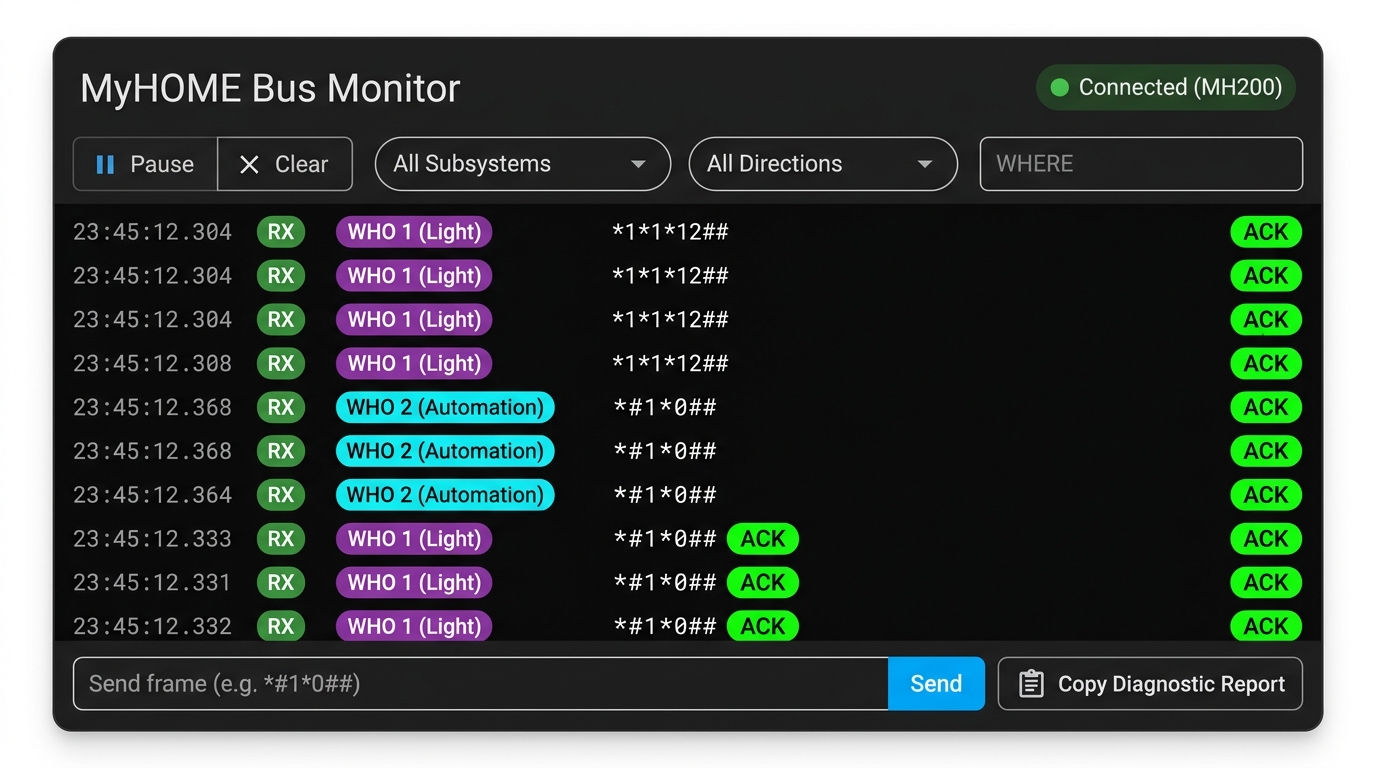
- Visual Card Picker: Add directly from Home Assistant's dashboard editor by searching for "MyHOME OpenWebNet Bus Monitor" (
custom:myhome-openwebnet-bus-monitor). - Live Feed & Frame Injector: Color-coded badges for subsystems, ACK/NACK highlighting, pause/resume, buffer filtering, and manual frame injection with syntax validation.
📖 Read the Bus Monitor Card Guide →
Comprehensive guides, specifications, and tutorials are available on our documentation site and wiki:
- 📖 Official Documentation Site
- 🏛️ OpenWebNet Protocol & WHO Specifications Wiki
- 🗺️ Development Roadmap and Stable v2.0.0 Pull Request #232
This integration is developed and maintained by the OpenWebNet-HA community organization.
- Community Hub & Discussions: GitHub Discussions
- Issue Tracker & Traces: GitHub Issues
- Phase 1 & 2 Pull Request: PR #232
- @anotherjulien for creating the original MyHOME integration and laying the protocol foundations.
- @GreenGrassBlueOcean for the modernized v2 architecture, declarative gateway profiles, streaming proxy, and automated test suite.
- @GianlucaCh for preserving and contributing the comprehensive 15-manual BTicino/Legrand specification archive (
OWN DOC.zip) and WHO 24 specs. - @xtimmy86x for the frontend administration panel, hardware diagnostics, and passive heating schedule traces.
- @Interstellar0verdrive for frontend panel enhancements, cover calibration UI, badges, and visual polish.
- @fedem95 for MH201 reliability, idle session reconnects, CEN+ hold logic, Italian translations, and physical plant fixtures.
- @mantovanellimatteo, @lyubomirtraykov, and Cedric Rohou for key bugfixes, DALI DT8 ballasts, and platform extensions.
Special gratitude to the community members whose authentic on-wire bus captures ground our 3,464+ CI tests in real hardware:
- @TheDarkWizard for MyHomeServer1 automation command-translation echoes and WHO 4 heating/cooling Home+Control traces (#378, #429).
- @f18m (Francesco Montorsi) for MyHomeServer1 & LN-4660M2 centralized shutter and advanced automation traces (#445).
- @lionelser for Legrand F455 Basic Gateway full bus sweep, modular dimmers, and pushbutton captures (#466).
- @gdluck for MyHomeServer1 live climate heating/cooling season switching, timed relays, and probe traces (#649).
- @ricdijk for BTicino F454 WHO 4 99-zone central unit (
#0) status captures (#629). - @wave68runner for MH200N + MyHomeServer1 dual-gateway 4-digit CEN scenario traces (#624).
- @caiosweet for BTicino MH200N full bus sweep and climate probe knob offset cycle captures (#466).
- @nicolacavallo84 for shared-bus dual gateway captures (MHS1 + H4890) and H4890 WHO 25 dry contacts (#453, #466).
- @gimprota76 (Giovanni) for BTicino F454 burglar alarm (WHO 5) and auxiliary channel (WHO 9) traces (#311).
- Current
master& Stable Releases (v0.9.4): Licensed under the GNU Affero General Public License v3.0 (AGPL-3.0). - Modern Beta Releases (v2.0.0b15) & V2 Architecture: Licensed under the Apache License 2.0 (aligning with Home Assistant Core).