

ReVPN: TUN-based mesh networking with UDP hole punching, automatic relay fallback, optional AF_XDP zero-copy, and a server-less mode that needs nothing but a STUN query and a token.




Creative by Rezier Labs.
No accounts, no cloud control plane, no dashboard to sign into. Run
one machine as the server (relay/rendezvous), run ReVPN.sh on every
other computer to join — clients connect directly to each other when
they can, and automatically fall back to relaying through the server
when they can't (strict routers/firewalls, symmetric NAT). Two
interoperable implementations — a C++ engine and a Python
port — speak the exact same wire protocol, so a Linux server, a
Windows client, and a Python client can all sit on one mesh together.
This project began with a simple question: how can a public server reach me — answer my requests, accept my connections — when I never configured port forwarding on my own router, and never opened a single port? I spent a long time researching that question before the answer clicked: UDP hole punching.

In short, most home routers use NAT (Network Address Translation) to share one public IP across every device behind them, and by default they silently drop unsolicited inbound traffic — which is exactly why port forwarding is normally required for anyone outside to reach you. UDP hole punching works around this without touching the router at all: both peers send a UDP packet toward each other at roughly the same time, using addresses learned through a third party (a rendezvous/signaling server) that both sides can already reach. Each outbound packet causes the router's NAT table to open a temporary "hole" — a mapping that lets return traffic from that specific remote address back in, purely as a side effect of the connection having been initiated from the inside. Once both sides' packets cross, that hole lines up on both ends, and the two peers can talk to each other directly — no forwarded port, no router configuration, no third party in the traffic path once the connection is established.
Understanding that mechanism was, honestly, one of the more exciting moments I've had studying real-time systems over the WAN. It led directly to this project: ReVPN takes UDP hole punching and uses it to bridge a virtual network interface (TUN) peer-to-peer between machines — conceptually similar to WireGuard, but deliberately simpler and more compact, built specifically to solve the everyday case of a PC sitting behind a NAT/router with no port forwarding available (a locked-down home router, a college dorm network, a mobile hotspot).
That idea goes further in decentralized mode
(ReVPN.sh --decentralized, Step 8):
no relay/rendezvous server at all, not even for setup. Instead of a
server both sides connect to, each side asks a public STUN server
"what does the internet see me as?", packs the answer into a short
token, and the two people exchange that token out-of-band — a chat
message, a voice call, however — then both sides use it to punch
straight through to each other. It's a real VPN peer once connected —
same TUN device, same wire protocol, same encryption as --client —
just with the server removed from the equation entirely, not only
from the data path but from the setup itself. Verified working live
between two independently-NATed machines on different networks: both
sides punched through on the first attempt.
cd ReVPN
./build.sh                                        # build the engine once

sudo ./ReVPN.sh --server --port 9000                  # on the server machine
sudo ./ReVPN.sh --client --connect <server-ip>:9000 --vpn-ip 10.13.0.2   # on each client
Give every client a different --vpn-ip (10.13.0.2, 10.13.0.3, ...).
That's a working mesh — ping, SSH, file shares, or game between any two
clients using their 10.13.0.x addresses, same as a LAN.
No flags handy? Run ./ReVPN.sh with no arguments for a full-screen menu
instead — pick Server or Client, fill in the same fields interactively,
and it remembers what you entered for next time.
- Abstract
- Quickstart
- Step 1 — Build it (Linux)
- Step 2 — Start the server
- Step 3 — Connect a client
- Step 4 — Prefer a menu over flags?
- ReVPN.sh vs calling the engine directly
- Step 5 — Common adjustments
- Step 6 — Windows
- Step 7 — Server-as-peer (server joins the mesh too)
- Step 8 — Decentralized mode (no server at all)
- Step 9 — Test it before relying on it
- What's in this folder
- Technical
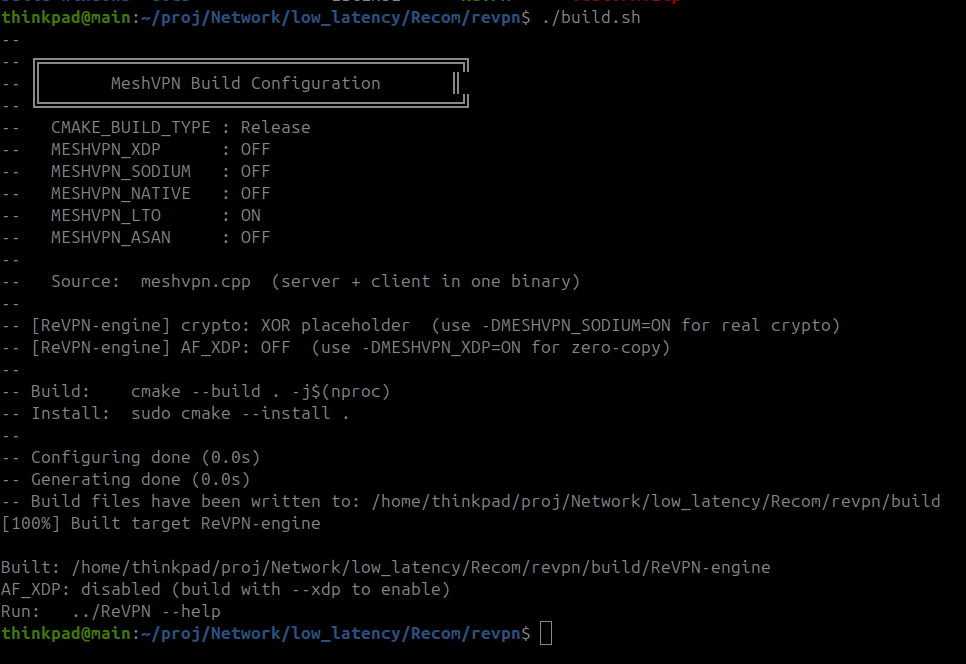
Figure 1: A clean ./build.sh run, producing build/ReVPN-engine.
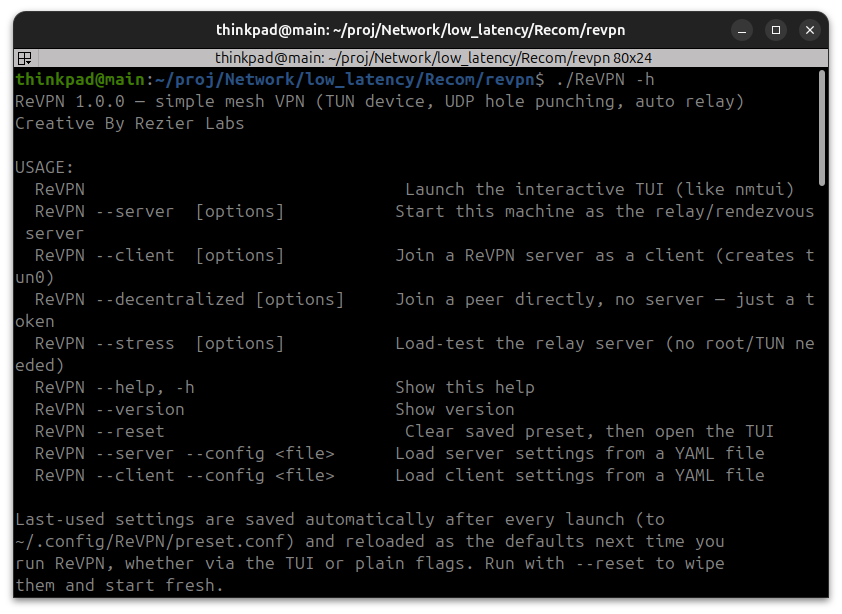
Figure 2: ./ReVPN.sh -h — the five modes: server, client, decentralized, stress, help.
cd ReVPN
./build.sh
This builds build/ReVPN-engine, the program the ReVPN.sh command drives.
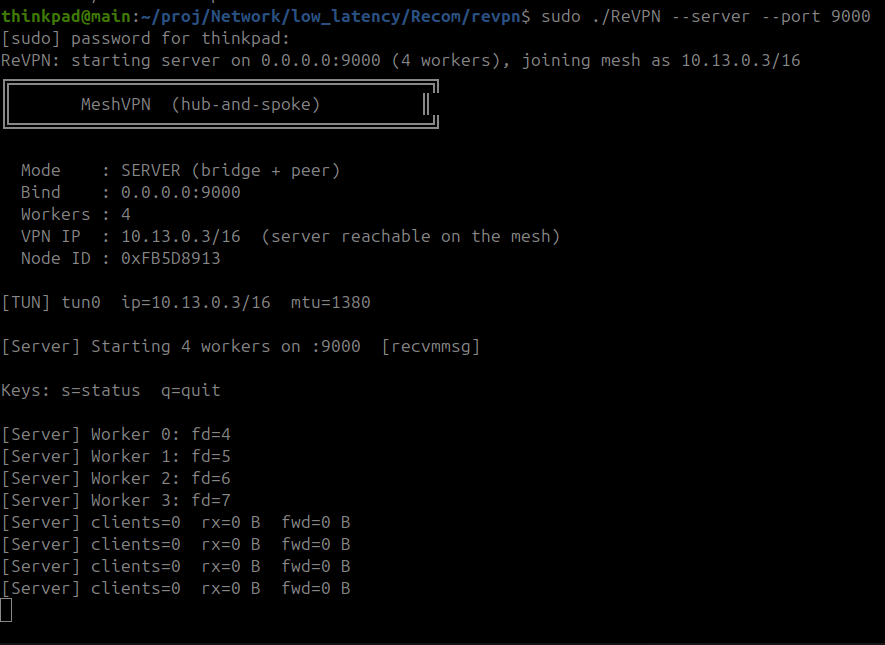
Figure 3: The relay server just after startup, no clients connected yet.
Pick one computer with a public/reachable IP to be the server everyone else connects through:
sudo ./ReVPN.sh --server --port 9000Leave this running. It doesn't join the network itself by default — it just introduces the clients to each other and relays traffic if needed (see Step 7 if you want the server machine reachable on the mesh too).
On every other computer you want on the network:
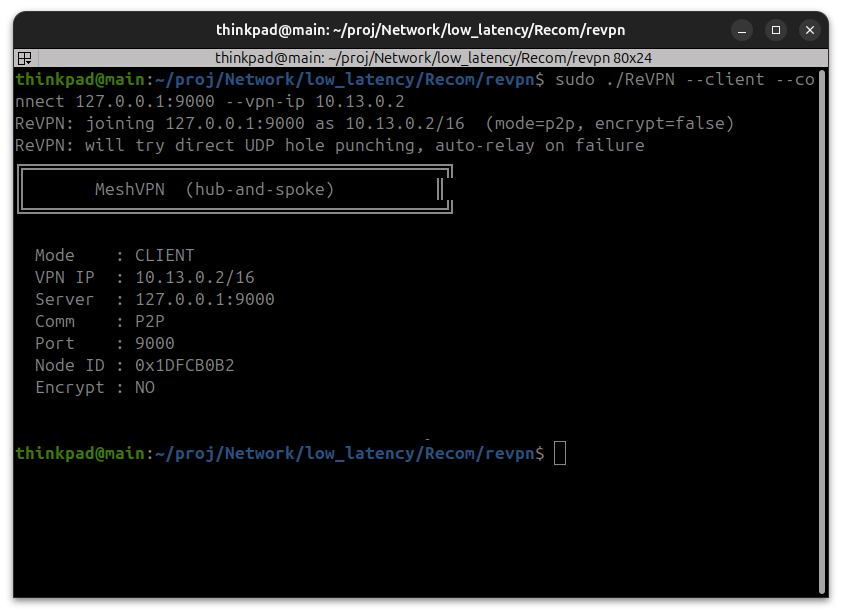
Figure 4: A client joining that server — VPN IP, node ID, and comm mode confirmed.
sudo ./ReVPN.sh --client --connect <server-ip>:9000 --vpn-ip 10.13.0.2Give each computer a different --vpn-ip — that's its address on
the private network. The next computer would use --vpn-ip 10.13.0.3,
and so on.
That's a working mesh: connect any two clients using their 10.13.0.x
addresses (ping, SSH, file shares, games — whatever you'd normally do
over a LAN).
Run ./ReVPN.sh with no arguments — a full-screen menu opens. Pick Server
or Client and fill in the same fields interactively; it remembers what
you entered last time and pre-fills it next time.
Everything above goes through ReVPN.sh — that's the right entry point
for interactive use, testing, and quickly trying out a config, since it
adds the TUI menu, saved presets, and --config YAML loading in bash
before ever touching the engine.
For a real, long-running deployment (a systemd unit, a Docker
container, an init script, anything that shouldn't depend on bash
being present) call the engine binary directly instead — it's a single
static-ish binary with no wrapper dependency, and as of the --config
support added to the engine itself, it can load the exact same YAML
files ReVPN.sh uses, with no bash in the loop at all:
# Server, straight from the binary:
sudo ./build/ReVPN-engine --mode server --config ./config/server.yaml

# Client, straight from the binary:
sudo ./build/ReVPN-engine --mode client --config ./config/client.yaml

# Decentralized, straight from the binary:
sudo ./build/ReVPN-engine --mode decentralized --id alice --vpn-ip 10.13.0.2
Precedence is identical either way: hardcoded defaults → --config
file → any flag also given on the command line. Use ReVPN.sh (or its
TUI) while you're figuring out settings or doing a quick manual test;
point systemd/Docker/init scripts at ./build/ReVPN-engine directly
once you know the config you want to run for real. Run
./build/ReVPN-engine --help for the engine's own full flag list.
--encrypt false— turn off encryption--relay-only— never attempt a direct connection, always relay through the server (useful behind very strict firewalls)./ReVPN.sh --help— every flag, with defaults
Two options:
- No Python needed: run the prebuilt engine directly, or with the
bundled menu wrapper —
ReVPN.bat(server fully works; client and decentralized mode need Wintun, see below), orReVPN-engine.exe --mode server --bind 0.0.0.0:9000. - Full menu, like the Linux version: install the Python version and
run
ReVPN(seepython/README.md) — this one also has the interactive menu.
First run install.bat (double-click it, or run from cmd/PowerShell).
It checks that build-windows\ReVPN-engine.exe exists, downloads
wintun.dll for your CPU architecture straight from
wintun.net into build-windows\ next to the
engine, and checks whether Python is on PATH (only needed for
python\ReVPN.py). Run it again any time; it skips steps that are
already done.
The firewall matters, not just Wintun. Without an exception,
Windows Firewall silently drops unsolicited inbound UDP — on a
peer-to-peer mode (--client/--decentralized) that looks exactly
like "my TX counter keeps climbing but RX stays at 0 forever, punch
never succeeds", because the other side's punch/ACK packets never
make it past the firewall to the engine. ReVPN.bat now handles this
itself: on every launch (any mode, from the menu or a flag) it checks
whether the ReVPN-engine Firewall rule exists, and if not, triggers
the normal Windows UAC "allow this app to make changes?" prompt — say
yes once, and it adds the inbound+outbound UDP rule for you and
carries on with whatever you asked for, no separate step needed.
Tunnel working but ping still times out? That's a second, separate
Windows Firewall default: inbound ICMPv4/ICMPv6 Echo Request ("File and
Printer Sharing — Echo Request") is off by default on any new network
adapter, Wintun's included — independent of the UDP program rule above.
You can have real tunnel traffic flowing (RX counters climbing, [P2P] OK DIRECT) and ping will still report 100% loss until this is allowed too.
ReVPN.bat adds this rule in the same self-elevating step as the UDP one,
so a single UAC prompt covers both. If you ever need to add either by hand:
Windows Defender Firewall → Advanced Settings → Inbound Rules → New Rule →
Program → point it at ReVPN-engine.exe → Allow, for UDP (the tunnel rule),
and a second rule → Custom → Protocol type ICMPv4 (and ICMPv6) → Specific
ICMP types → Echo Request → Allow (the ping rule).
ReVPN.bat supports all three modes — --server, --client, and
--decentralized — through the same interactive menu or flags as the
Linux ReVPN.sh (see Step 8
for what decentralized mode is). There's no --stress in the batch
version; use python\ReVPN.py --stress for that.
Windows can run the server fully today. The client and
decentralized modes load Wintun
dynamically at startup — install.bat fetches wintun.dll for you
(or download it yourself and place it next to ReVPN-engine.exe),
then run as Administrator. This path is untested on real Windows
hardware (built and run so far only under Wine, which has no Wintun
driver to actually exercise it against) — if it doesn't work, fall
back to the Linux client, WSL, or ReVPN-py's independent Wintun
backend.
If the window just vanishes right after finishing the decentralized
token prompt (or any other step) with no visible error: that's a plain
Windows .bat quirk, not a crash you can't see the cause of. Double-
clicking ReVPN.bat opens a console window with no parent cmd.exe to
return to — the instant the engine process exits, for any reason
(success, a crash, missing Administrator rights, missing wintun.dll),
the whole window closes with it, taking any error message with it.
ReVPN.bat now pauses with the error code and a "see the output above"
message whenever the engine exits non-zero, instead of closing
immediately — update to the latest version if you're still seeing the
disappearing-window behavior. If you want to see output either way
(including a clean exit), run it from an already-open cmd.exe window
(ReVPN.bat --decentralized ...) instead of double-clicking it.
By default the server is a pure relay with no VPN identity of its own.
Add --vpn-ip to server mode (Linux, or Windows via Wintun — same as
--client/--decentralized, see Step 6) to have
the server machine open its own TUN device and join the mesh as a
regular peer — clients can then reach the server itself at that
address, not just relay through it for each other:
sudo ./ReVPN.sh --server --port 9000 --vpn-ip 10.13.0.1REM Windows — run ReVPN-engine.exe as Administrator, with wintun.dll
REM next to it (install.bat sets that up):
ReVPN.bat --server --port 9000 --vpn-ip 10.13.0.1The TUI's Server form (and ReVPN.bat's own menu) asks the same
question ("Also join the mesh yourself?") and fills in
--vpn-ip/--subnet for you if you say yes.

Figure 5: Network topology of decentralized mode — direct tunnels between peer sites, no server.
Everything above needs one machine running --server that both sides
can reach. Decentralized mode drops that requirement entirely — peers
connect directly, with nothing in between but a public STUN
server (used only to ask "what does the internet see me as?") and a
short token each pair exchanges by hand — paste it into a chat,
read it over a call, whatever. See the Abstract for the
UDP hole punching concept behind this.
This isn't limited to two peers — it's a real mesh. Every peer prints its own token and accepts one or more tokens back, so a group of 3+ just exchanges tokens all-around (everyone needs everyone else's, since there's no server to introduce them).
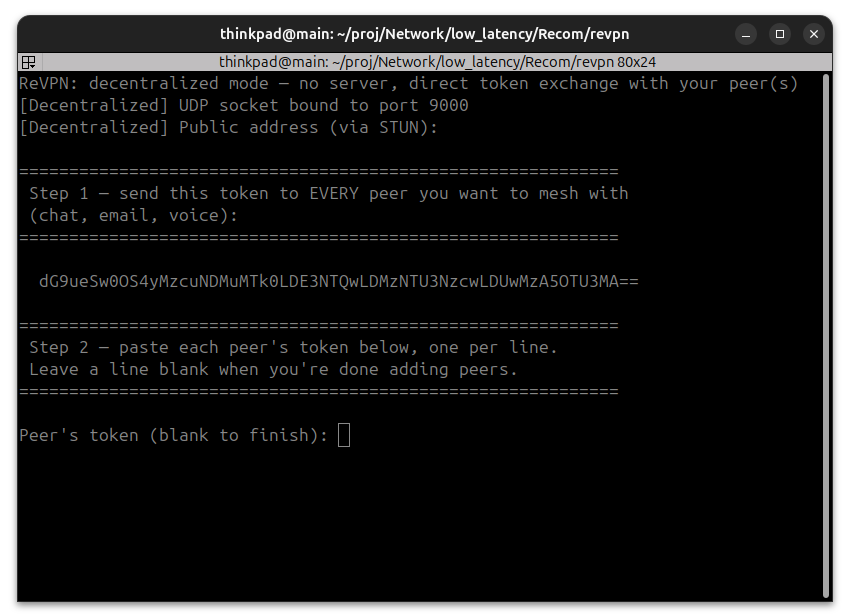
Figure 6: The token exchange screen — send your token, paste peers' tokens back.
On each side:
# Alice:
sudo ./ReVPN.sh --decentralized --id alice --vpn-ip 10.13.0.2

# Bob:
sudo ./ReVPN.sh --decentralized --id bob --vpn-ip 10.13.0.3
Each side prints a token and then waits for the other side's:
============================================================
 Step 1 — send this token to EVERY peer you want to mesh with
 (chat, email, voice):
============================================================

  YWxpY2UsNDkuMjM3LjE3NC4xODksOTM3OCwzMzU1Nzc3MCw1MDMwOTk1NzA=

============================================================
 Step 2 — paste each peer's token below, one per line.
 Leave a line blank when you're done adding peers.
============================================================

Peer's token (blank to finish):
Send Alice's token to Bob (and Bob's back to Alice) any way you like —
chat, email, read it aloud. Once each side has pasted the other's
token in, both hole-punch straight to each other and a real TUN
device comes up on each side (10.13.0.2 and 10.13.0.3 here) —
ping, SSH, anything, same as --client/--server, just with no
server in the picture at any point.
For a group of 3+, everybody pastes in one line per peer (Alice pastes Bob's and Carol's tokens, Bob pastes Alice's and Carol's, and so on), then hits blank/enter to start punching to all of them.
No arguments? The TUI has a Decentralized entry on the main menu that asks for your name and VPN IP, then walks you through the same token exchange on a plain screen.
Two peers behind the same router? The token also carries each side's LAN-facing IP, not just its public one — so if you and a peer are testing from two machines on the same home/office network (same public IP as seen by STUN), punching tries the LAN address too instead of relying only on the public one. That matters because a lot of consumer routers don't support NAT hairpinning (a packet from inside the LAN addressed to the router's own public IP, meant to be routed back to another device on the same LAN, silently gets dropped) — which looks exactly like "TX keeps climbing, RX stays at 0 forever, punch never succeeds" even though both sides are on, firewalled correctly, and sending. If you hit that symptom with two peers on the same network, update to a build with this fix (older tokens lack the LAN fields and fall back to public-only punching).
Both the LAN and public candidates get punched every tick, and whichever
ACK comes back first locks in DIRECT — but ReVPN also makes sure a
later, slower public-path ACK can't un-lock an already-established
private-address link, which would otherwise quietly send your traffic the
long way round through your router/ISP and back even though both peers
are three feet apart. This check is generic (any RFC1918/CGNAT/link-local
address, not just an exact match on the one LAN candidate exchanged in
the token) — behind some NATs (two peers sharing a phone hotspot, for
example) the address that actually ends up working is a third one
neither side declared, translated by an intermediate hop, but it's still
worth preferring over the public one. Confirmation it's actually using a
short path: [P2P] OK DIRECT prints (LAN) whenever the winning address
is private. If you still see tens of milliseconds of latency between two
machines that should be close, check that line, and check that both
sides' declared LAN addresses (printed at startup) are actually on a
mutually-reachable network — sharing the same public IP (e.g. both
behind the same CGNAT/mobile carrier) doesn't necessarily mean a direct
private route exists between them.
Once DIRECT, the locked address stays locked — it no longer gets
re-picked on every ACK (the one exception is a one-time public→private
upgrade). Some NATs, phone hotspots especially, can answer for the same
peer from more than one private-looking address; re-locking onto a
"newer" one mid-session forces the far end's NAT to re-map its state,
which drops/delays whatever was in flight during the switch. If you see
heavy packet loss and wild jitter through the tunnel while a plain
ping to the peer's real IP outside the tunnel is clean, that address
flapping was almost certainly the cause.
MTU: the TUN MTU defaults to 1380, chosen to survive typical internet
paths (PPPoE and other overhead-heavy links often can't do a full 1500
end-to-end, and ReVPN doesn't fragment — an oversized packet just gets
dropped). Pass --mtu 1500 when you know the full path supports it, e.g.
two peers on the same LAN/switch.
--mtu isn't capped at 1500, though — any value from 576 up to 9216
is accepted (packet buffers are sized for it), covering jumbo frames
(2048, 9000, etc.) for links that actually support them, e.g. a
datacenter/LAN segment with jumbo frames enabled. A value outside
576–9216 is rejected at startup with a clear error instead of silently
truncating every oversized packet later. The catch is the same as always:
every hop on the real path — both ends' physical NICs, any switches
in between, and this VPN's own --mtu on both sides — has to agree on
the larger size, or packets above the smallest hop's real limit just get
dropped with no automatic fallback. If you're not sure the whole path
supports it, stick to 1500 or lower.
--vpn-ip     ip     This node's VPN IP, e.g. 10.13.0.2       (required)
--id         name   Your display name, shown in the token    (required)
--port       n      Local UDP port                            (default: 51001)
--peer-token <tok>  A peer's token, as a flag instead of being prompted
                     for it. Repeat the flag (or comma-separate) for a
                     mesh of 3+ peers.
--session <file>    Auto-reconnect on restart (opt-in) — see below.
--encrypt <true|false>  Encrypt tunnel traffic               (default: true)
There's no relay to fall back on here, so decentralized mode's reconnection story splits into two very different cases:
1. Connection lost while both processes keep running (network blip,
Wi-Fi roam, NAT keepalive hiccup) — this is already automatic, no flag
needed. A direct link that goes silent for 3s drops to FALLBACK and
retries the punch every 10s, forever, in the background — you'll see
[Decentralized] Retrying punch to 0x... in the log and it reconnects
on its own the moment packets can flow again. The NAT-delta wide
port-prediction from the symmetric-NAT section above runs on every one
of those retries too, not just the first attempt.
2. The process itself was killed or restarted (crash, Ctrl+C,
systemctl restart, the machine rebooted) — this is the case where
you'd otherwise have to re-paste every peer's token from scratch,
since nothing survives the exchange by default. --session <file>
fixes that:
# Linux
./ReVPN.sh --decentralized --id alice --vpn-ip 10.13.0.2 --session ./config/alice.session
:: Windows
ReVPN.bat --decentralized --id alice --vpn-ip 10.13.0.2 --session config\alice.sessionBoth wrappers also ask about this in their interactive menu (the TUI for
ReVPN.sh, the plain set /p form for ReVPN.bat) — a y/N prompt that
defaults to off, offering config/session-<id>.token as the suggested
path if you say yes. Either way it's the same --session <file> flag
underneath, forwarded straight to the engine.
- First run: exchanges tokens as normal (paste or
--peer-token), then saves them toalice.session,chmod 600. - Every run after that (same
--sessionpath): skips the paste prompt entirely and reconnects straight from the saved tokens — combine with a manual--port(see above) so your own address is likely to come back unchanged too, and the other side's existing background retry (case 1, already running on their end) picks you back up with no action needed on either side. - Delete the file any time to force a fresh token exchange — useful if a peer's address has genuinely changed (new network, ISP reassigned their IP) and the old saved token can no longer reach them.
This is opt-in and off by default on purpose: a peer token is a bearer
secret — anyone holding one can punch/send data straight to that node's
VPN IP — so unlike every other decentralized setting, it is never
written to disk unless you explicitly pass --session. Both ReVPN.sh
and ReVPN.bat's interactive menus ask about this explicitly (y/N,
defaulting to off) rather than silently defaulting it on.
No second computer handy? Simulate one:
./ReVPN.sh --stress --clients 200 --duration 30This throws 200 simulated clients at your server locally, no admin rights or second machine needed, and prints a report (throughput, packet loss) so you can sanity-check a server before depending on it.
After switching both the Linux and Windows engines from fixed-interval
polling to event-driven I/O (epoll_wait/timerfd on Linux,
WintunGetReadWaitEvent/WSAEventSelect on Windows — see
Architecture), these numbers come from two real phones/PCs
over mobile and home WAN links, not a loopback simulation:
| Path (Overlay/Underlay) | Src → Dst | I/O model | Sent | Recv | Loss | Avg RTT |
|---|---|---|---|---|---|---|
| Client ↔ Server (Overlay) | PC → 10.13.0.1 |
Event-driven (epoll/IOCP) | 282 | 282 | 0% | 42 ms |
| Client ↔ Server (Underlay) | PC → 43.XXX.XX.XX |
Raw WAN baseline | 279 | 279 | 0% | 38 ms |
| Client ↔ Client (P2P, Overlay) | PC → 10.13.0.5 |
Event-driven, direct UDP punch | 7 | 7 | 0% | 115 ms |
- Overlay = traffic through the VPN tunnel (
10.13.0.xaddresses). - Underlay = the raw internet path to the peer's public IP, used as a baseline so tunnel overhead can be told apart from ordinary WAN/mobile jitter.
- Overlay RTT tracks the underlay baseline closely — the remaining variance is mobile/WAN jitter, not VPN-tunnel overhead.
- Before the event-driven fix, the fixed polling interval itself could beat against periodic traffic (e.g. 1 Hz ping) and cause measurable loss on the tunnel path; all three paths above now show 0% loss.
- The P2P row confirms UDP hole punching completes and traffic flows
direct between peers (
[P2P] OK DIRECT ...) rather than relayed through the server — see Step 8.
Real-world case that came up testing two peers on different networks, both stuck forever at:
[Status] 0x0902DC4C:PUNCHING  TX:48  RX:0
[P2P] WARN Punch timeout vpn=10.13.0.10  (11 attempts, 10s) → relay fallback. Press 'f' to retry.
[Decentralized] Retrying punch to 0x0902DC4C...
on both sides, repeating forever — packets are being sent, nothing is coming back. Here's what was actually happening and how it's handled now.
The root cause — symmetric NAT. Compare the two peers' startup logs:
# Peer "me":    bound locally to :51001  →  STUN reports public 183.89.6.251:51001   (port preserved)
# Peer "mexfa":  bound locally to :51001  →  STUN reports public 49.237.68.251:15502  (port REMAPPED)
Peer "me" is behind a NAT that preserves the local port — port 51001 in,
port 51001 out. Totally normal, hole punching works fine against this kind
of NAT. Peer "mexfa" is behind a symmetric NAT (very common on mobile
carrier/CGNAT networks): its router hands out a different external port
for every new UDP destination it talks to. The port 15502 it got back
from the STUN server has nothing to do with the port the other peer's
packets will actually land on — that mapping was created specifically for
talking to the STUN server, not for talking to peer "me". So:
- "me" → "mexfa": punches go to
49.237.68.251:15502, which is the wrong door — mexfa's NAT only forwards packets on that port if they're coming from the STUN server's IP. They get silently dropped. RX stays 0 forever. - "mexfa" → "me": these can land fine (me's NAT is port-preserving), but since "me"'s punches never arrive at the right door, the handshake never completes in either direction — a hole punch needs packets flowing both ways to lock in.
This is a fundamental limit of plain STUN-based hole punching: it only reliably works when at least one side is behind a full-cone or restricted-cone NAT. Two symmetric NATs (or one symmetric NAT whose mapping is genuinely random per-destination) can't be punched with a single learned port, no matter how long you retry — which is exactly why the log above just repeats the same timeout/retry cycle forever instead of eventually succeeding.
The fix — measure and predict the NAT's port step, in EVERY P2P mode. Most symmetric NATs aren't random about the external port they hand out — they allocate sequentially (each new UDP mapping gets the previous external port + some fixed step). ReVPN measures its own NAT's step at startup, and this is not decentralized-only — it runs for both P2P paths:
--mode decentralized(no server — hand-copied tokens)--mode client --comm p2p(server-as-peer — the server introduces two clients viaPEER_INFO, then they punch direct)
The helper (p2p_detect_nat_delta() in engine/meshvpn.cpp) lives above
both the Server/Client structs and the decentralized-mode code so
either path can call it:
- On top of the main socket, it opens two more throwaway UDP sockets on two adjacent local ports and asks the public STUN server (Google's) what external port each one gets back.
- The difference between those two external ports is the NAT's per-mapping port step. If both STUN replies come back with the same public IP (confirming it's one stable NAT, not a flaky/changing path), that step is trustworthy.
- That step then travels to the other side over whichever channel that
mode already uses to exchange addresses:
- Decentralized: embedded as an extra field in the token you hand
your peer (
id,pub_ip,pub_port,vpn_ip,node_id,lan_ip,lan_port,nat_delta, base64-encoded — same token, one more number). - Server-as-peer: embedded as a new
nat_deltafield in theREGISTERpacket sent to the server, which the server relays straight through inside thePEER_INFOpackets it forwards to every other client — no new round trip, no protocol version bump (it's carved out of what used to be unused padding bytes, so an older unpatched peer in the mesh still sends0there, which just means "unknown", same as always).
- Decentralized: embedded as an extra field in the token you hand
your peer (
- Either way, once a peer has a nonzero
nat_deltafor someone it's punching toward, it no longer just tries the exact reported port ±8 — it also fans out 40 extra punch probes at multiples of that step (±1×,±2×, ...±20×the step) around the reported port. One of those guesses lands on the real external port the symmetric NAT will actually use for this peer-to-peer conversation, and the handshake completes.
At startup you'll see this reported directly, with the exact wording depending on which mode you're in:
[Decentralized] NAT allocates ports in steps of 37 — sharing that with peers so they can punch wide if needed
[P2P] Our NAT allocates ports in steps of 37 — sharing that via REGISTER so peers can punch wide if needed
If the step can't be measured (STUN fails, or the public IP differs
between the two probe sockets — meaning the path itself is unstable, not
just the NAT), nat_delta is sent as 0 and ReVPN silently falls back to
the plain ±8 search it always had, then relay fallback if that still
doesn't connect. In server-as-peer mode this measurement only runs for
--comm p2p clients — plain --comm relay clients never punch, so there's
no reason to spend the extra STUN round trips. Old decentralized tokens
and old REGISTER packets from before this change still parse/decode
fine (the field is optional on the wire either way) — there's nothing to
re-exchange on the other side of an upgrade except a fresh token, or just
restarting an old client against a new server/peer.
What this doesn't fix: a NAT that allocates external ports truly
randomly per destination (no fixed step at all) can't be predicted by any
amount of guessing — only full TURN-style relaying through a third host
works there. For ReVPN that's exactly what --relay-fallback already
does, automatically, after the punch attempts above are exhausted.
ReVPN.sh— the command you run (also opens the menu with no arguments)ReVPN.bat— the Windows equivalent, wrappingbuild-windows\ReVPN-engine.exe(same--server/--client/--decentralizedmodes, plain-text menu)install.bat— run once on Windows to installwintun.dll(needed byReVPN.bat --client/--decentralized) and sanity-check the engine binaryvendor/wintun/— the Wintun driver (v0.14.1), vendored for all Windows architectures (amd64/arm64/x86/arm) soinstall.batworks offline; seevendor/wintun/CREDIT.mdfor credit/licensepython/— a Python version of the same tool, for Windows and anyone who'd rather not compile C++ (seepython/README.md)config/— example settings files (--config path/to/file.yaml)- everything else (
engine/,build*.sh,tools/) is internal — see Layout below
- Server (
--mode serverin the engine): a stateless UDP rendezvous/relay. No TUN device, no VPN identity of its own by default — it just remembers each client's publicip:portand forwards packets between them. Multi-threaded withSO_REUSEPORT+recvmmsgbatching on Linux. Pass--vpn-ip(Linux, or Windows via Wintun — see Step 7) to have it also open a TUN device and join the mesh as a regular peer; clients already route unknown/server-bound traffic to the server's address by default, so no client-side change is needed. - Client: opens a TUN device (
tun0), registers with the server, and runs a hole-punching state machine per peer:PUNCHING → (ack) → DIRECT, orPUNCHING → (10s timeout) → FALLBACK(relay via server). ADIRECTlink that goes silent for 3s drops back toFALLBACK; fallback retries punching again every 30s unless you force it. Symmetric-NAT port prediction: probes ±1..8 around the known port on every punch. - Wire protocol: fixed-size packed structs —
RegPkt(50B, REGISTER/PEER_INFO),PunchPkt/KaPkt(5B),DataHdr(11B) + payload. Seeengine/meshvpn.cpp's top comment andpython/ReVPN/protocol.pyfor exact byte layouts. This is what makes the C++ engine, the Python port, and the Windows builds all interoperate — same bytes on the wire regardless of which one sent them. - Optional AF_XDP zero-copy RX path on Linux (
--xdp-iface, needs a build with./build.sh --xdp); falls back torecvmmsgeverywhere else. - Encryption is currently an XOR placeholder cipher (
--encrypt falseto disable) — swap for real crypto via-DMESHVPN_SODIUMif you need it.
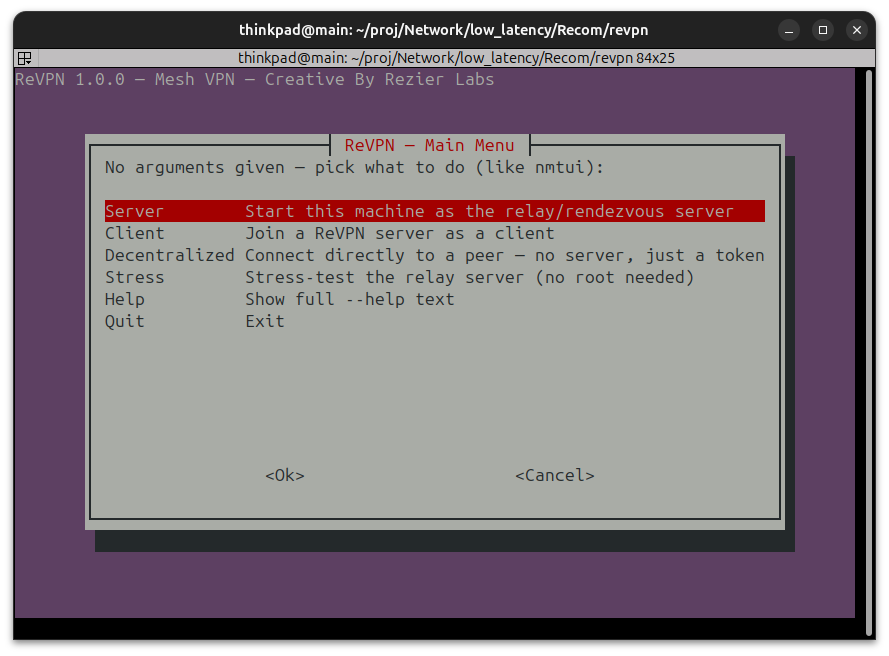
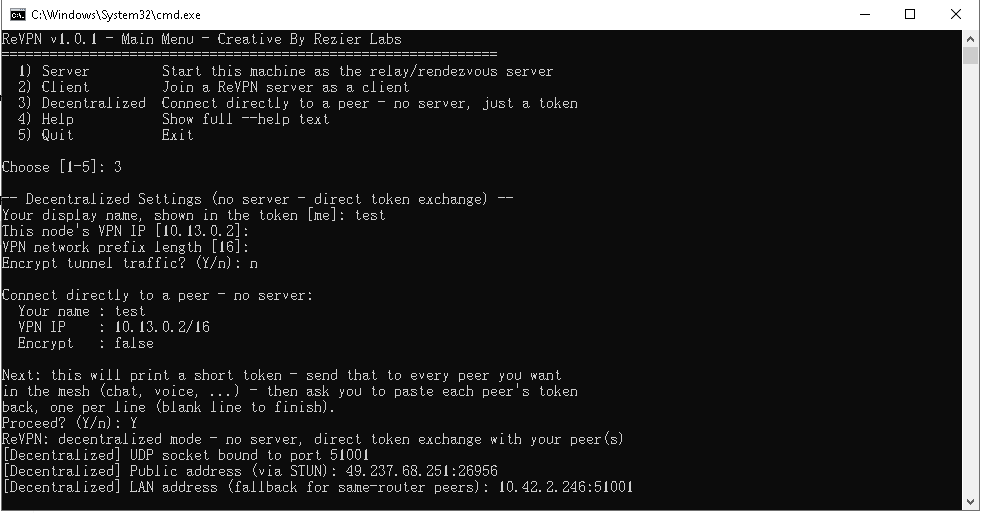
Figure 7: The TUI main menu — the same five modes, picked from a whiptail screen.
Running ReVPN.sh with no arguments opens a full-screen menu (whiptail,
falling back to dialog, falling back to plain --help text if
neither is installed) — Server / Client / Stress / Help / Quit, each
walking through the same fields the flags accept, then a confirm
screen before launching. The AF_XDP interface field is a picker built
from this machine's real ip link output (never free-typed), and is
only offered if the engine was built with ./build.sh --xdp (checked
via a build/.xdp_enabled marker file, not by probing the binary).
The Server form also offers server-as-peer (Step 7, Linux or Windows)
and adjusts the confirm screen to show the resulting VPN IP/subnet when
enabled. ReVPN.bat's own menu has the same question for its Server
form.
Every launch (TUI or flags) saves what you used to config/preset.conf
(next to ReVPN.sh itself, not under your home directory — this keeps
a checkout fully self-contained), and reloads it as the new defaults
next time — flags you do pass always win. ./ReVPN.sh --reset wipes it
and opens the menu with the original hardcoded defaults. --config <file>
loads a flat key: value YAML file instead (see config/server.yaml
/ config/client.yaml); precedence is defaults → saved preset →
--config file → explicit flag.
build/ReVPN-engine itself also understands --config <file> —
same flat YAML format and key set (minus the stress-test-only keys,
which don't apply to the binary), same precedence, no bash or preset
file involved. That's what makes it safe to call the engine directly
in a systemd unit or Docker container: point --config at a file you
control and every run behaves identically, with no dependency on
ReVPN.sh or its saved preset file at all.
ReVPN.sh also writes one of these for you: every successful
--server, --client, or --decentralized launch regenerates
config/generated-<mode>.yaml, matching whatever settings actually
ran (flags, preset, or an earlier --config, whichever won), and
prints the exact ReVPN-engine --mode ... --config ... command to run
it directly next time. Peer tokens are one-time secrets and are never
written into it — pass --peer-token alongside --config for
decentralized mode. Try a setup through the TUI or flags once, then
hand the generated file straight to a systemd unit or container. See
ReVPN.sh vs calling
the engine directly above.
The TUI's Persistence menu item automates the systemd side of this:
pick client or server mode and a saved --config file (typically a
generated-<mode>.yaml from above), and it writes a ready-to-use
config/systemd/revpn-<mode>.service unit — pointing ExecStart at
build/ReVPN-engine --mode <mode> --config <file> — plus the exact
sudo cp / systemctl daemon-reload / systemctl enable --now revpn-<mode>
commands to install and start it on every boot. Nothing is installed
system-wide automatically; you run those commands yourself.
--stress starts a throwaway server plus N synthetic UDP "clients"
(tools/stress_client.py, or the Python port's in-process equivalent)
that speak just enough of the wire protocol to REGISTER and flood data
packets, arranged in a ring (client i → client i+1) so the server
does real per-packet routing-table lookups rather than a simple
broadcast fan-out. It reports wall-clock time, the server's own
observed rx/fwd byte counters (converted to pps/Mbps), and estimated
packet loss. Sample run (150 simulated clients, 8s, 400 pps each, 800B
payload, single dev machine): ~294 Mbps, ~45k packets/sec, ~4.5% loss
— useful as a relative benchmark across machines/kernels, not an
absolute number.
There are two separate Windows binaries:
build-windows/ReVPN-engine.exe |
python/dist/ReVPN.exe |
|
|---|---|---|
| Built from | engine/meshvpn.cpp (C++), MinGW cross-compile |
python/ReVPN.py, PyInstaller (hosted in Wine) |
| Has the interactive menu? | Via ReVPN.bat (plain text menu) |
Yes — same curses menu as Linux |
--server |
Full C++ engine (recvmmsg-class throughput) | Pure-Python server |
--client / TUN |
Own Wintun integration (dynamically loaded wintun.dll), unverified on real hardware |
Independent Wintun backend, unverified on real hardware |
--decentralized |
Supported via ReVPN.bat --decentralized (same Wintun dependency as --client) |
Not exposed on the Windows build |
Server-as-peer (--vpn-ip) |
Supported — own Wintun adapter (ReVPNS0), same as --client |
Not exposed on the Windows build |
| Stress test | Via the bash ReVPN.sh --stress wrapper, not the raw .exe |
Built in (--stress, or from the menu) |
Build them with ./build_windows.sh (needs
g++-mingw-w64-x86-64-posix binutils-mingw-w64-x86-64) and
cd python && ./build_windows_exe.sh (needs wine; downloads a
Windows Python + PyInstaller into a dedicated Wine prefix on first
run) respectively. After building (or grabbing a prebuilt
ReVPN-engine.exe), run install.bat once to fetch wintun.dll for
--client/--decentralized.
What's actually been tested (all under Wine — no real Windows hardware was available):
- Both
.exes:--mode serverstarts, multi-worker mode works, and real UDP traffic from a synthetic client was correctly REGISTERed and routed (rx/fwd byte counters increased as expected). - The C++
.exe's--mode clientcorrectly fails with a clear message whenwintun.dllisn't present (Wine has no Wintun driver, so the real adapter-creation path —WintunCreateAdapter/WintunStartSession/TUN read-write — could not be exercised end to end; that part needs verification on real Windows hardware). --mode server --vpn-ip ...(server-as-peer) on the Windows build fails cleanly with an explicit "needs Linux/WSL2" message rather than crashing, since TUN creation there is Linux-only.- The Python
.exe's menu was driven end-to-end through a pipe (menu → Stress form, pre-filled from a saved preset → confirm → a real stress run → back to the menu). Full-screen arrow-key input specifically wasn't confirmed working through this test's headless-Wine-over-pty setup (rendering was correct; key events didn't forward in that specific harness) — expected to work on a real Windows console, which reads input differently, but unconfirmed on real hardware. pip install .(the Python package) was verified on a freshly installed Wine-hosted Windows Python (a clean-machine proxy): it resolved and installed thewindows-cursesdependency automatically, created a workingReVPN.exeshim onPATH, andReVPN.sh --help/--stressran correctly from an unrelated directory viacmd.exe.- One Wine-specific quirk found (not expected on real Windows): the
Python
.exe's stdout can fail with an "Invalid handle" error if redirected straight to a plain file; piping (| cat,| tee, intotmux, etc.) works reliably and is how all the above was tested.
engine/— the C++ engine source (meshvpn.cpp,xdp_kern.c,xdp_sock.*,CMakeLists.txt), originally from../vpn.build.sh/build_windows.sh— buildengine/intobuild/ReVPN-engine(Linux) orbuild-windows/ReVPN-engine.exe(MinGW cross-compile).ReVPN.sh— the CLI + TUI wrapper end users run.ReVPN.bat/install.bat— the Windows CLI + menu wrapper and its dependency installer (fetcheswintun.dll).stress_test.sh/tools/stress_client.py— the load-test harness.config/— exampleserver.yaml/client.yamlfor--config.python/—ReVPN-py: a pure-Python, wire-compatible port of this same CLI/TUI/server/client (pip install-able, plus a standalone Windows.exebuild). Seepython/README.md.docs/ReVPN-architecture.drawio— technical architecture diagram (server/client/decentralized modes, wire protocol, build outputs). Open at app.diagrams.net (File → Open From → Device) or the draw.io VS Code extension.experiments/— standalone concept tests, not part of the product build. Seeexperiments/README.md.
Created by Rezier Labs. Licensed under the
PolyForm Noncommercial License 1.0.0 — free to use, modify,
and redistribute for any noncommercial purpose (personal, educational,
research, nonprofit). Commercial use requires a separate license from
Rezier Labs. See the LICENSE file for the full terms.
- Wintun — the Windows TUN driver vendored in
vendor/wintun/, © WireGuard LLC / Jason A. Donenfeld, licensed under GPLv2 (or a separate commercial license from WireGuard LLC). Seevendor/wintun/CREDIT.mdandvendor/wintun/LICENSE.txt.